Category: Film

  • What the F

    Last January I bought a Nikon F6, the most advanced film SLR camera ever created. Over the past few weeks I have been tracking down a Nikon F, Nikon’s original film SLR, camera on eBay. The F6 has fully electronic control and a self-diagnosing shutter. The F is fully mechanical and is not at all self-aware. I am obsessed with the F6’s ability to capture data about exposures and write information to a CF card and to the film itself. So, why would I want a Nikon F? For me the Nikon F represents a certain beginning to modern photography. Since the end of the Kodak APS era I have been a Nikon user and have fully adopted the Nikon culture (not to mention the F-mount lens system). I can’t say that its nostalgia because I wasn’t alive with the Nikon F was released, but there is a desire to touch history and to experience using a fully manual camera, learning to calculate exposure values and becoming more aware of the dynamics of focus selection. I also have some apprehension about approaching a method of photography that has absolutely no electronic assistance or guide, which I have been dependent on since I began photography when I was 5.

    My Nikon F is due to arrive around April 4th.

      Nikon F6 Nikon F
    Exposure Control Manual, Shutter, Aperture, Program Auto Manual
    Aperture Control On-Body Electronic Drive Manual
    Shutter Speeds 1/8000 to 30 min + Bulb 1/1000 to 1” + Bulb
    Power Source CR123 or EN-EL4 Manual
    Auto Focus TTL phase detection, Nikon Multi-CAM 2000 autofocus module Manual
    Film Loading Auto Crank (Manual)
    Film Advance Auto Manual
    Film Rewind Auto Manual
    Multiple Exposure Yes – 2 to 10 Manual
    Self-timer 2, 5, 10, 20 seconds 3-10 seconds (manual gear timer)
    Intervalometer Electronic Program Interval None
    Remote Cable release, ML-3 Wireless Cable release
    Weight 975g (34.4 oz) 1049g (37 oz)
    Released 2004 1959
  • Experimenting with Rollei IR 400

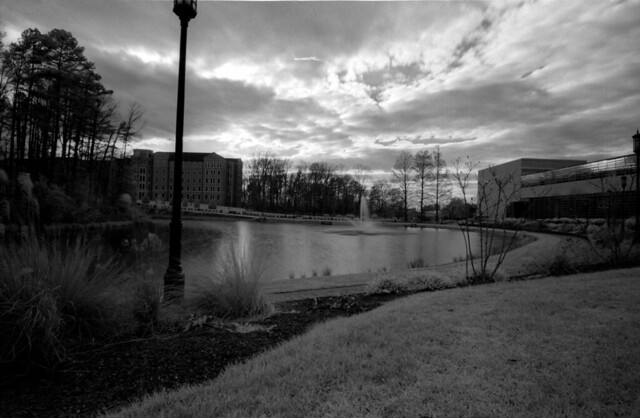
    I have been fascinated by IR photography since I first figured out what it was. I started off as a digital camera brat, so most of my experiences were with really slow shutter speeds on a sensor mostly protected from IR light. Since returning to film I have gotten back into IR and find that it is both frustrating and fun to work with. Until recently my only extended red film has been Ilford’s SFX 200, which is a just barely IR sensitive film (720nm). I have recently discovered Rolleri’s series of films, most of which are more sensitive to red than Ilford’s standard films. Their IR 400 film, which is sensitive to 820nm, has a greater range than anything I’ve worked with before. For my test roll I experimented a lot with exposure settings as IR is very different for metering from visible light. For SFX 200 I have to reduce the metered speed by several stops for a good exposure. IR 400 is not quite as sensitive and seems to require several stops of increase to avoid a dark image.

    R74_E21
    IR 400 with R72 filtration
    R74_E08
    IR 400 with R25 filtration

    Overall I am impressed with some of the results I have gotten with IR 400 on the test roll, but am looking forward to seeing more of the results that I get when I develop my second roll now that I have more of an idea of the type of exposure levels that work well with the film.

  • Response to Ken Rockwell’s ‘Why We Love Film’

    I have read Ken Rockwell’s reviews of lenses for years before buying them, and aside from his necessary self-promotion at the end of each review, I’ve found his site quite informative and helpful. Last evening I ran across his post entitled ‘Why We Love Film’ (http://www.kenrockwell.com/tech/why-we-love-film.htm) and found myself approaching the post as a dual-medium shooter (film + digital) and feeling the need to pick apart some of his biases.

    Overall the content of the article is interesting and would be very informative to someone who has never shot film before, but for the truly religious digital shooter, it is offensive and off-putting. Mr. Rockwell directly insults those individuals, so if he was hoping to convert a few people or at least encourage experimentation I think he may be having the opposite effect. The article comes across as a bit nostalgic at the beginning, referencing his 1956 Kodak that ‘does not need batteries’. This does not seem relevant as newer Nikon film cameras will run for a year or more on two batteries. The low power consumption is not universal to film though, as the F5 requires 8 AA batteries. Sure you can just throw them out and replace them, but ultimately in this age we are more likely to put them in a charger and plug them into the wall at night! Its the same thing, just a different medium. Again, Mr. Rockwell seems attached to the nostalgia of a camera that does not require batteries, but yet I fear that even if Nikon’s next Pro D-SLR ran on solar power, he would still not be satisfied on this option. It is not the film medium that Mr. Rockwell is advocating for, but rather a much simpler era in photographic history.

    An area where Mr. Rockwell and I are in complete agreement is the lack of an LCD being a very positive for a photographer’s focus. It is easier to think about the next shot when you aren’t reviewing and in too many cases its too easy to look at the display and doubt yourself.  I think this is more of an issue for amateur photographers and for complete nerds (who would NEVER consider film as a viable medium). I think experienced photographers get over this need to check themselves, especially sports photographers who DO realize that there is no time to waste with image review. Also, Nikon’s D-SLRs have a great option for this – IMAGE REVIEW: OFF.  As for Mr. Rockwell’s safety jab, well, I don’t know what moron crosses the road looking at the screen of their SLR, but it seems today people are in much greater danger with crossing the street with cell phones.  In another article Mr. Rockwell mentions that since he was 10 years old he has been writing down the exposure settings of every frame. In his review of the F6 he mentions that this is taken care of by the camera itself and he can just download the data for storing with his frames, but wait, the Nikon F6 requires… BATTERIES! Mr. Rockwell seems off-put by computers and their ‘time wasting’ capabilities, but that feature of the F6 he loves so much does require a computer, whether you use a Nikon MV-1 adapter or a Meta35 USB device.

    Mr. Rockwell addresses the color range of film. Yes, film range is natively awesome (assuming it is processed correctly and assuming your exposure was perfect), but the key problem with digital cameras is not their lack of range on the sensor, but instead the lack of range provided by the various compression formats. Shooting a Nikon D750 in RAW will give you a single file that is perfectly capable of expressing wide range, it just requires a little work to make it visible electronically (tone mapping primarily). What good is the range of film if the only way to share it with someone is in person? I suppose this calls back to what is the purpose of the medium in general. If photography is to be an intimate expression of lived moments with others who were there, then yes, this makes sense, but if the purpose of photography is to be archival and to be shared, then the limitations of range being expressed only in the original format is lacking in this goal.

    One topic upon which I will not argue with Mr. Rockwell – film grain looks better than digital ‘grain’. Film in its multi-layered emulsion is an organic creation, there is no set pattern of how the grain falls. Film images are cleaner and feel less hazy because they don’t have an unnatural grain as a result of sensor noise. I think eventually digital technology will get there, especially with the improvements in high ISO performance, but will it ever meet the comforting feel of a film grain? I really don’t know.

    Ironically,  despite my critique of Mr. Rockwell’s article, I decided to buy an F6 instead of an F5 because it requires less battery power and will keep details of my shots electronically, freeing me to focus more on the image.
  • An Update to My Developing Process

    Over three years ago when I first dove into film photography and the related development process I wrote an article, The Developing Process. In that time I have adjusted some of the basic techniques a bit and have changed my materials as well.

    Last time was just a list of steps, this is perhaps less useful as a guide to others getting started in film developing, so I will this time begin with materials.


    Materials Needed

    • Developing Tank Kit (Tank, reel, light-proof funnel, lid)
    • Scissors and bottle opener
    • Weighted Film Hangars
    • Beakers (500mL is adequate for a single roll)
    • Mixed developer (I suggest Ilford ID-11 or another high-quality developer)
    • Fixer (I use Ilford’s Rapid Fix Non-Hardening)
    • Stop Bath (optional, but recommended, I use IlfoStop)
    • Wetting Agent (optional, but I use Kodak PhotoFlo)
    • Clock with seconds (or an iOS or Android device loaded with DigitalTruth’s Massive Dev Chart Timer)
    • Thermometer for developer


    The Process

    Step 1:

    • Set up tank (cleaned), reel, bottle opener, film and scissors in light-proof room
    • Turn off the lights
    • Open film canister and gently remove film roll
    • Cut off half-width leader on front of roll
    • Load film on to reel
    • Cut end of film off of the roll
    • Insert reel into tank
    • Insert center column and funnel
    • Lid tank tightly
    • Turn lights back on

    Step 2:

    • Load the developer in the tank. Start developer timer.
    • Determine the developer time by a chart provided by the developer maker or film maker
    • Time the developer based on film type and temperature of the developer bath
    • At end of time, empty developer.
    • Pour in stop bath solution
    • Agitate for about 1 minute
    • Some guides suggest pre-rinsing film, I do not, as it saturates the film and may alter development times.

    Step 3:

    • Pour in fixer (1:4 mix for Illford Rapid)
    • Fix for 5 – 10 minutes, agitate for 10 seconds every minute
    • Empty tank

    Step 4:

    • Wash film for 5-10 minutes by allowing running water to flow into and out of the tank
    • A film washing hose can introduce pressure to the process and ensure a more thorough wash.
    • Mix a drop of wetting agent with enough water for the tank
    • Pour in wetting solution, agitate for 30 seconds, dump.

    Step 5

    • Remove funnel from tank. Remove reel from tank.
    • Pull end of roll free from reel and attach the weighted hangar
    • Gently pull remainder of the roll free from the reel
    • Clamp non-weighted hangar to front of the roll
    • Hang to let dry (usually overnight works well)


    At this point I typically make Chris cut my film into strips of 5, and then I scan them to digital, but more adventurous people are free to make contact sheets or produce enlargements.

    About Reusing Chemicals

    • Most developers discourage reuse, so do I. Use it once, then toss it, its not worth it to have developer you can’t trust
    • Until recently I did not reuse fixer, but now I do. When developing multiple rolls close together (same day or few day period), I will reuse my working-strength fixer.
    • Stop Bath is usually “indicator stop bath”, if its yellow, you are good to go, if it starts to change colors, toss it. It dies with the absorption of developer, but it will let you know when.
    • Wetting Agent – it takes about an eye-dropper of wetting agent per roll. I toss used wetting agent mixtures.


    Notes

    • Most fixers no longer contain “hypo”, and thus, there is no need for a hypo-clearing agent
    • Wetting agent is nice to help the film dry, but film isn’t ruined without it
    • Stop Bath completely stops development, I recommend it for beginners as it gives a measure of safety to the process
    • If using the DigtalTruth Massive Dev chart app, it will walk you through most of the steps, including when to agitate and when to not agitate.
  • Film and Developer from a Novice Perspective

    I have been working with film photography off and on for about 2 years now, since about March 2010. I have used a variety of films and chemicals since the beginning. I am now slowly learning what everything I have been working with does and how each element impacts the outcome of the final image.

    One of the things I have learned most recently is that contrary to the film to digital sensor analogy, noise/grain in images are not entirely the responsibility of the film. It seems that a fine grain film is only as good as the developer it is used with. I was wondering why different film I was processing had similar attributes, apparently it is a result of the developer. Processing Neopan 400 and processing HP5+ should not look very similar, each have their own characteristics, but yet some of the flaws I was running into with one was also occurring with the other.

    I began processing film with a very basic developer that I acquired from Adorama. That was ok for the first roll or two, but I quickly learned that it was much too harsh and didn’t work as well as I would like for making images that could be preserved as components of my artistic portfolio. I then moved to Kodak’s D-76 at the suggestion and urging of many film photographers. I am somewhat happy with the results from D76. It is efficient and produces a moderate size grain on the negative. The problem comes with my needs for enlargement and high-resolution digital storage of the image. D76 is not fine enough for what I’m looking for as I’m often disappointed with the way that my images come out when I look at them at full size. After much reading I have decided to try Ilford’s ID-11. I was tempted to try Perceptol, but it seems a little excessive, being described as a “very fine” grain developer that can easily push process up to 2 steps on all film or 4 steps on Ilford film. Perceptol is an expensive developer which is described in a way that makes it seem overkill for my needs. ID-11 on the other hand seems like it will be a perfect match for Delta 400 as well as HP5+.

    As for film, I have used several different film: Fujifilm Neopan 400, Ilford HP5+, Kodak Tri-X 125 (ISO 125 film) and now Ilford Delta 400. Each film has different characteristics. Neopan has fairly even toning, but doesn’t seem to reach true white or true black unless processing is either pushed or pulled. Neopan also suffers from large grain which makes the image itself less sharp than it should be given the speed at which they have been shot. The handling of the range is not always that good either as it sometimes seems more sensitive to light spots than to the dark. HP5+ seems to have the opposite problem, it is usually better at handling darks than lights. An interesting thing I have noticed about HP5+ is that its grain is somewhat more pronounced than that of Neopan 400, but yet the grain is less distracting and does not seem to distort the image the way that Neopan does. I also feel like the tonal handling of HP5+ is a little flat. Exposures come out pretty even, but it is almost too balanced, there is a lot of grey and not much black or white. Ilford Delta 400 I have only processed one roll of and I am not really sure what I think of it yet. My first impression is that it does not favor the grey region as much as HP5+ does, nor does it have a favoring of bright spots like Neopan 400. Delta 400 uses black and white pretty uniformly and there are clear white and black regions of the film. Delta 400 also has a very clean grain. It looks almost silky in appearance and seems to handle most things pretty well, including macro photography (which seems to come out badly on most other film).

    Ilford Delta 400 Professional

    Ilford HP5+

    Fujifilm Neopan 400

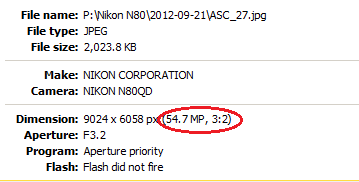
  • Another reason I love film


    54.7 Megapixel may be excessive, but it is very nice to have access to that pixel density.

  • Self-Critique of the Latest Film Rolls

    1. I need to learn to be less afraid of different apertures.

    I shoot a lot with my aperture wide open (smallest f/ratio). This shot of a mushroom cluster could have been a lot better had I closed the aperture some and gotten a little more depth. Probably not f/8, but perhaps f/4 or 5.6 (this one was shot at a macro-level f/3). 

    2. I need to think with the contrast of black and white film in mind.

    This would have been a very interesting shot if I would have been more mindful of black and white photographic contrast and perhaps let the image be a little darker to let the vibrant colors shine more clearly with tonality other than just white.

    3. Consider the impact of shadow.

    Black and white photography relies on the use of shadow and light to compose an image. As such, shadows in the wrong place and ruin the composition of an image. In a color image this is less critical, but still important.

  • Frustration of a Film Photographer in the Digital Age

    • It takes 2 minutes to scan a single BW 35mm negative on a traditional scanner at 2400dpi
    • It takes 7 minutes to scan a single BW 35mm negative on a traditional scanner at 4800dpi
    • Traditional scanners use “trays” and “adapters” which are not part of the scanner itself to hold negatives, this results in things that move and aren’t always aligned
    • There is no instant verification at low-res before moving on to high-res scanning on traditional scanners
    • Most “film scanners” are cheap crap that have more in common with a digital camera than a scanner. Film is analog and therefore requires optical projection to reach a desired result
    • Most independent film scanners assume colour negatives. BW negatives have color (shades of blue/green and yellow), but those colors are not intended to be seen in the finished product.
    • “Real” film scanners cost $1000-$5000


    I enjoy film photography as an artistic hobby. It allows for more expression and limited options to trick or cheat one’s way out of problems in photography. In some ways film photography feels more “human” to me than any digital method ever has. The problem with this view is that I am in a digital age, which I eagerly embrace. I like the analog methods of recording an image, but I do not embrace the mess, difficulty or annoyance of printing photos to paper using traditional photographic printing methods. As a result of this combining of processes I find that my best option for handling my film is to scan it.

    I have attempted to scan my film using a low-end “film scanner” and a standard Canon flatbed scanner with a film adapter unit. I was not impressed with the 5 megapixel images produced by the film scanner, but am quite happy with the output of the Canon flatbed, which ranges between about 7.1 MP for 2400dpi or 31MP for 4800dpi. The difficulty is that at 31 MP it takes 7 minutes to perform the scans and it is very difficult to get the scanner to output perfectly. The biggest issue is a gradient at the very bottom of each frame, which I can’t seem to get to go away. Despite these problems, the Canon scanner is currently my best option for taking on this process. I do find irony in using a Canon scanner to scan negatives produced on a Nikon camera.

    Modern interpretations of the inexpensive film scanner that I had used in the past now have features like a built-in display and they function without special software. The screens are a nice touch, but I find those models tend to have the lowest reviews on Amazon for their technical abilities. I suspect those models are intended for an instant-gratification group of people who may simply enjoy digging through boxes of old negatives and reliving memories with friends and family and not for a serious photographer who wishes to save their work in a digital form. This brings me to another point. It is hard to tell what people are having problems with on these devices. People complain about color loss when scanning. First of all, I am not scanning color film. Second, Kodachrome and similar technologies do not have a very long life span and once the film begins to degrade (especially if it was developed commercially) then it begins to loose its vibrance. The bad reviews can be caused by bad film, not a bad scanner, which makes this process even harder.

    One of the biggest problems I am having with determining what to do about this situation is looking at scanner specs I am told a lot of different size ratings (megapixels), but no one seems very willing to give me information in density (dots per inch). On a flatbed scanner the DPI is an interesting measure because there is a correlation between the output size and the density due to the physical size of the film frame.

    For the moment it seems my best option is to keep working with the Canon flatbed scanner and attempt to be patient with it.

  • Film Photos: Roll ID 2010-004

    This roll is certainly more fetish inspired, but I tried to work with aesthetics while doing so.

    Polished BootsPolished BootsDakota BootsNike Shox CL2Dakota Boots
    Dakota BootsDakota BootsChippewa Super LoggerChippewa Logger BootsSupper Logger Logo
    EyeletsToesOsiris D3Osiris D3Osiris D3
    T-Mac ToeT-Mac PortraitT-Mac LandscapeWilson of Boot BoxesCatepillar Work Boots
    Osiris BronxDakota At RestOn The Laddar - From BelowIn the DarknessOn the Laddar
    In the Darkness IIIn The Darkness IIIIn the Darkness IVAir Max BWShox MTX
    Chippewa Black LoggersChippewa Black LoggersNike Shox CLNike Shox CLGlobe Focus
    Globe FocusNike Cross Training

  • Film Photos: Roll ID 2010-003

    My third roll of film. These shots are just as haphazard as before, but I let myself go a little more wild and actually do more subjects that interest me. The scanning process didn’t go too well for this roll and some other factors seem to have made the grain pretty intense. None of these have been retouched or edited yet, so there is still hope for them. Obviously there was some fetish influence on some of these images as well.

    EXP_1EXP_2EXP_3EXP_4EXP_5
    EXP_6EXP_7EXP_8EXP_9EXP_10
    EXP_11EXP_12EXP_13EXP_14EXP_15
    EXP_16EXP_17EXP_18EXP_19EXP_20
    EXP_21EXP_22EXP_23EXP_24EXP_25
    EXP_26EXP_27EXP_28EXP_29EXP_30
    EXP_31EXP_32EXP_33EXP_34EXP_35
    EXP_36EXP_37