Category: Programming

  • GITI v3 Module Preparedness

    So far not a lot has been done on GITI v3. Chris has taken charge of the new back-end, most notably, giving me a sane framework to work from. It’s like having a really stripped down version of .NET, except it runs on PHP (so far it handles my database calls a lot more efficiently). I have not yet picked a menu system or even decided exactly what v3 will look like. Many of my readers will likely recall a lot of the really goofy early designs for v2. So far I’m not doing any better than that for v3 and honestly, I was hoping for some of Chris’ brilliance to pop out in the form of a really cool menu system. Guess I’m just going to have to locate one that can be modified to work in GITI. 

    Anyway, the point of this post isn’t the GITI problems, its to point out the readiness status of modules for the new version.

    Education – first module to be added to v2 and will be the first module I try to convert for v3 as well. Without it, GITI just isn’t GITI. It should be easy enough to audit the code and make it compatible with v3 and just bring it over for the most part. There are some additions that need to be made such as making it support the idea of multiple academic careers. As I am planning to soon be a graduate student, this addition means a lot to me.

    Schedule – I think at this point its safe to call this module “trouble”. I believe the intention for this module is to rewrite it before moving it into v3. This is the type of rewrite that involves throwing out the book and starting from a new concept. The module is severely limited in what it does and in many ways is too one dimensional.

    ToDo List – v3 will be the demise of the traditional TODO module that was nothing more than a glorified notepad with dates attached. The ToDo List module is in its infancy in v2, but should be easy enough to mature into a functioning module for version 3. Chris has taken a liking to this module, mostly because he wants to have the ability to assign todo items across users. I suspect I will regret letting him take on that module as it will give him much power over how that works, but I’m willing to see what he does with it.

    Footwear Collection – This module is mostly feature complete in itself. There are a few tweaks that need to be made, but otherwise the module is good to upgrade and transfer. Not shocked, its Chris’ module.

    Status – I really want to see this module develop more, so I will be working on it before it is scheduled to be moved. I like the general function of it, but I want to see more power from it. I want more ways to be able to update my status when away from the Interface, and I want tagging ability to have discretion over destinations, in some ways I want to be able to utilize it a bit as a journal, say if an update is tagged as #PVT. It would also be cool to make something more robust as far as management, perhaps the ability to cancel a status by sending a follow up message to the system commanding it to remove the previous entry.

    Library – this is the abandoned wasteland of GITI. I often fail to remember to enter things in it and in general do not find it useful. If I did not believe it was possible to have it be useful, I would likely remove the module, but I see it as having potential and having a purpose. I will be working on expanding the module to be more useful to all of its users. I have been promising some people a better version of library for a while now. I also have to make sure that I include some type of adaptive CSV or plain text bulk input, as some users have other lists which need to be converted to the GITI Library system. A lot of users could benefit from check-in/check-out functionality, which I seem to have misplaced since the old code.

    Cookbook – This module will be moved to v3 almost as it is now. Its not complete, but its complete enough to be fully functional. The module will eventually improved, but it is a low priority in the v3 upgrade.

    Journal, Address Book, Keychain – These three are pretty much feature complete and other than an update for their current level of usefulness they are ready to be upgraded. Keychain is likely to receive an additional feature set upgrade and application counterpart soon after v3 is completed.

    System Modules: Item Journal, Tags – Item Journal al is called upon by numerous modules and thus, it is important that it is ready. Tags was nothing more than experimental in GITI v2, having no real use or purpose, but some GITI items did receive tags. My plan is to ask Chris to work with me on integrating these two modules into the framework in some way, perhaps as part of his grand plan for things to allow all modules to call them with minimal difficulty.


    I originally wanted to have things at least partially functional by 10 days from now, in time for the new semester, but things have gotten behind and will likely have to be worked on throughout the semester. If its great and ready by Christmas I will be happier than if its rushed and kind of lame and works by convocation.
  • Current GITI Modules

    The current active user-visible modules are as follows:

    • Address Book
    • *Administration
    • #Email
    • Cookbook
    • Education
    • Schedule (+v3)
    • Footwear Collection
    • Health
      • Exercise
      • Nutrition
      • Sexual Activity Log
    • Library
    • Journal
    • Notepad
    • Documents
    • Software Keychain
    • #ToDo
    • ToDo List
    • Inventory
    • Site Engine Administration
    • Project365
    • Weather
    • Home/System
      • Games
      • Time
      • About


    In addition there are other modules that the users do not directly interact with that provide inter-module functionality:

    • Item Journal
    • Tags
    • Quick Access
    • *Fields


    # = A module to be discontinued and hidden

    * = Not truly a module, but part of the structure of GITI

  • Planning GITI v3 – Continued

    In writing the previous post, I reviewed a few of my past posts about GITI, specifically the ones mentioning changes in approach or some type of concept for its development. A lot of concepts were out of my reach before, but now I feel more prepared to take on those things.

    A module I have considered adding is ‘History’, which would essentially be a general log that may be contributed to by all modules to report on actives of the user. The log would include things in a short narrative of the activity, for example, it may say something like “Curtis completed Exam 4 in Behavior Modification on July 14, 2010 at 17:10”.  The idea would be that a user could look back over the records for the past day and determine what they have done.

    In a similar intention as the ‘History’ module, I believe that it should be possible to interact with the interface in a journaling method. While some modules are for output to the user (education, schedule, todo list), there are some modules that are more input based (meal record, masturbation log, journal, status) and stay silent unless the user adds information. For that reason those modules that are for output do not normally appear on the main summary page for GITI, which limits their usability.

    I am hoping to perform a systematic review of the state of all modules and examine how they are used during the v3 development process and somehow integrating them all in a meaningful way so that they can be as valuable as possible to the users (me and my alternate selves).

    I have a lot of ideas involving social networking, but they are not things that I can take into account permanently in the interface because as far as I’m concerned, they are just a current fad and one day will fall. This does not deter me from wanting an “external services” module of some type that would perhaps do things like gather my Flickr stats or other pieces of information like that. One of the ideas behind GITI was to be more of a portal, something you set your browser’s home page to and that will help you get your session started with relevant information. I have to manage to do this without turning into a social network of one though. The modern APIs for many services make the portal idea more feasible.

    Fields is an area that has been an absolute main in the ass since the day the idea for it was conceived. Fields is a convoluted collection of categories, custom items and other little things that tend to be user specific, and some that are system specific and some that are very general (in PHP, getting days of the week from a database is so very easy compared to other methods). Currently the management area for fields is pretty well hidden from the user, except for a small form that barely works. That form is the only way for the average user to interact with the fields, and as a result, most of the interaction I have with the fields system is done by connecting to the database server directly and making the changes manually. I’m glad GITI has no actual users. What I would like to do for this problem is for version 3, give the major modules the ability to edit their fields from within the module. I am thinking of a universal form, but something that each module would call to allow changing things specific to it, so that the user isn’t left entirely without context for what the field value applies to (I wrote a lot of my fields about 7 years ago, do you think I remember what they all mean?). The desire for the modules to handle their own fields has been around a while, as it was documented in GITI Ideal #4.

    I mentioned above the Journal module being primarily an input module. This in itself is all well and good, except for the fact that the module comes across as intimidating. For such a simple module, that’s a bad thing. It seems like you should have a 500 word essay to write in the thing, when that’s not the way the module is designed. I want to refine this so its a more welcoming module. On the other side of things, its cousin, Item Journal, is integrated into a few modules and gives very little space, making the user feel like they can only put in tiny bits of data. This is a problem that really does not seem to have a correction for this version. I do however, think that item journal should be more present in other modules, and I do wish to work on that during the upgrade.

    Doc is a very techie kind of module. It uses a standard HTML text area to accept the user’s document. The area has been carefully designed to appear exactly the same as a blank document in Word XP as far as columns and rows for a 1 page document. I want to move beyond that. I want to have better editing tools in the UI itself, even if the back end storage stays the same. Of course, it should be possible to suppress any advanced features so that it is possible to write a simple, clean text document.


    In the previous post I made mention of a way to make things like social features easy to turn off or ignore, as part of the effort to consider that, I am implementing a new GITI Ideal:

    Modularity of Service Functions (#7): GITI modules that utilize any data functionality to an outside service or module, beyond communication with its own database table must perform such functions in a segment of code stored in an external file from the primary module functionality.

  • Planning GITI v3

    Only July 20, 2005 the GITI v2 project was conceived and on was transitioned to on December 19, 2005, with conversions continuing until August 2006. A lot has changed in life and in the world since that release, and as a result, GITI is now ready for a new overhaul.

    About the Development Process: Because of the way that GITI is structured, the interface itself does not get modified much during its normal lifecycle, it gets a bit of cleaning and polishing here and there, but for the most part, it doesn’t get touched. All development that happens while a major version is active is for the expansion and refinement of individual modules. The interface itself is merely a vehicle for the modules. Its less code and more concept. The development of a major version seems to be mostly a re-evaluation of the way the system operates and then running all of the modules back through being reworked to match the new goals (or the mysterious GITI “Ideals”).

    For the 3rd generation of GITI my primary goal for the interface is to address the issue of module overcrowding. Currently there are a lot of modules and the number of them present is growing. It is very difficult to use the current menus to get to everything effectively. The next major goal is to implement some sort of security system, including the ability to generate users on request and have a default security context that is as safe as a playground. Another big thing for me is getting things to be more “socially capable”. Per-user settings for Twitter updates for more aspects of things would be cool, but I don’t want to write code that locks us into any specific social format, I want to write something that is extensible and terminable (if Facebook dies, the components for it should be easily neuter-able). The social component also includes the ability to do more things from a mobile method. I’m also hoping version 3 is the version that will carry a mobile-compatible version of GITI itself.


    Here are some of my pet objectives.

    • Better “interface”
      • Resolve module overcrowding
      • Better menus
      • Improve the “quick” menu item
        • better internal documentation
      • There should be less page changing for editing
      • Details from “summary” should not require a page change
    • Security
      • Groups, permissions and all of that fun stuff
      • Ability to administer users
      • Key-auth for RSS clients (read only)
      • Capabilities for authenticating GITI users to external services
      • Establish a single, authoritive, domain name
    • Documentation
      • Documentation in the code for later modification
      • Ability to keep documentation for modules in GITI, to be turned on my COMMAND at user request
      • Written protocol for how modules should behave in the context of the interface
    • Module Specific Updates
      • New Module ‘ToDo List’ needs to be finished
      • Old Module ‘TODO’ needs to be exercised and destroyed
      • Schedule needs to accept invitations both ways
      • Schedule v3 needs to be completed (or is it started?)
      • Docs needs to have a better way for assigning where to store the ‘doc’
      • Reactivate ‘Inventory’, make is more universally usable
      • Library needs to be finished
    • Mobile/Social
      • Expansion of the status theory for things like schedule items
      • Allow other modules to Tweet
      • Create a standard way for modules to speak to various social mediums
      • Investigate options for GITI mobile, as well as usefulness evaluation
      • Create a standard way for a module to send email notifications
    • Public
      • Relevant modules should have an easy way to be sharable through GITI public
      • Public should take on at least a resemblance to the rest of the interface.
    • Burry the dead
      • Unused modules need to go
      • Modules that haven’t been changed since v1 need to be updated or be dismissed


    The version 3 update will not likely include anything as groundbreaking as GITI v2’s ‘COMMAND’ structure, but hopefully it will result in a more useful tool.

  • New App: Match Maker Duplicate Finder

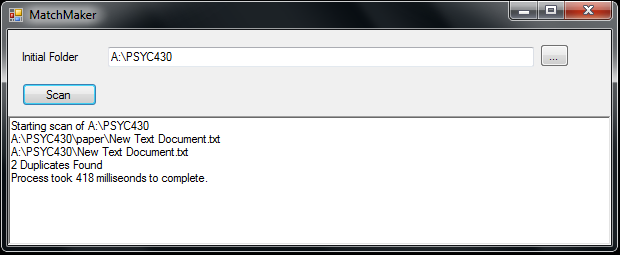
    At some point over the last few hours I threw together this application, its a minor app. I needed a way to identify potentially duplicate files in a certain folder on my network, and I really didn’t want to do it manually, so here is a quick little program to take care of that task in a rather dirty fashion. I use the program to identify potentially duplicate videos that have been stored in dated folders after being downloaded.

    The application is written in C# and requires .NET 3.5 to run (if you are on a modern Windows OS, you are ok). The program will take a folder you specify and treat it as the top of the tree, and from there recursively gather filenames. Once those names are gathered it compares all of the base file names as well as sizes. Not a fancy app, but thought it might be useful to someone.

    For Download: http://users.pcfire.net/~curtis/software/DuplicateFinder.exe  [14KB]

    image

  • Another semester almost finished

    It is hard to believe that yet another semester is almost over. It feels like it has snuck up on me. This morning GITI popped up with information for my first final exam of the semester. This semester has gone by quite quick, and I feel like it had really just gotten going. I have been more active this semester with a variety of things than I have been in a lot of semesters. I have developed a sense of direction on things, and have begun to embrace the uniquely eclectic nature of my interests. It is interesting to see how so many of them can connect and interact.

    There is one thing that has gone abandoned this semester… GITI. The Getting It Together Interface has not received any substantial code changes, and I have not even begun planning for its summer maintenance period (those 10 days between Spring and Summer semester, and the month between Summer and Fall). There are some changes that I started on last year that I will try to finish up this year, but otherwise nothing else is yet planned. I feel as though I really need to get GITI finished this summer, since I will likely be graduating soon, and it would be nice to have it finished, even if it will never be used for academic tasks by anyone again. I can’t believe I started working on GITI during the summer of 2003. Its been in development for 7 years, which I guess is good for something that was only supposed to be a temporary solution between professional apps.  This is the longest I have kept any one application for any task (I switch email clients about yearly), and also the longest I have kept up with any one project. I guess GITI has a special place in my life. Central location for most everything in my life. Now that I am struggling with C# programming I am still thinking of GITI, trying to work out ways for everything to go back to that one central point. Even with things like ExIf35 I think of how could it would be if I could make everything roam back to GITI, and just have everything centrally managed. If GITI were to have a 3rd version, it would have to include web, mobile and desktop components, so that all aspects of everything (being quite literal here) could be tracked in GITI.

    I can’t say that in general this has been the most productive semester in terms of number of papers written, and other things with a tangible significance, but I do feel that I have made a lot of progress in figuring out who I am, mellowing out my personality a little, and getting to a point where I am comfortable with everything that comes with being me.

  • World’s Worst Written Manual

    http://exif35.pcfire.net/docs.php?doc=manual

    There it is. I have looked over it several times and tried to correct on it, but I just don’t know exactly where to begin making this document something that a human (specifically a film photog) would actually be able/want to read. Obviously my skills for writing do not extend to software documentation. This is my first time ever having to actually write out documentation and unfortunately, I don’t have a bunch of trained monkeys working to turn my overly-technical docs into something more usable.

  • Writing Destructive Code Is Fun

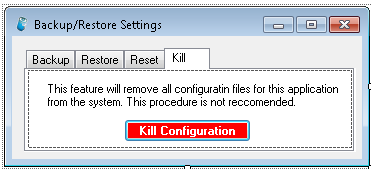
    I don’t know why, but writing code that is somewhat destructive is really fun. I was thinking earlier that there is no way in ExIf35 itself to fully remove the configuration file and remove personally-identifying information from the application. This seemed like it could be a bad things, so I set out to make a simple feature addition to ExIf35, a kill switch. It’s probably a little childish to make it this dramatic or to enjoy writing the code this much, but how often do you get to tell an application to go through and individually remove every file in a (system) folder? I didn’t do the really annoying application kill thing where there are 5 nested boxes asking variations of “Are you sure?”.

    image

    Red is always a fun color for a button, makes it look important and mysterious.

  • 35 vs DSC

    It would seem that just as I am spending time with film again, I am also leaving ExIfDSC alone a little longer and working on ExIf35, even if I don’t really understand why. I keep adding features and finding little things that ExIf35 needs, when I don’t even have a clue what ExIfDSC is. I have done some work on ExIfDSC and certainly proposed theoretical functionality, but as of yet, its mission isn’t completely clear. I want to do things a certain way, but I am not sure how they will work out when they are put into practice, and I in general don’t have a background for which to build ExIfDSC. ExIf35 is a niche tool, which makes it easy. I don’t have to compete. My happy little tool does what it is supposed to do, and the world is a happy place. I decide on features based on what needs to be done to be additionally useful to the end-user. Since I am for the most part unrivaled in a utility that writes a complete metadata set for files, and specializing in record keeping for film. There are a few other tools, but none with my level of detail. I am very scientific and I must have information stored a certain way for a hobby to be useful to me, so hence it exists. ExIfDSC is harder. Tools exist to do what I am trying to do, at least in part. I don’t like that the tools are usually linked to huge clunky image viewers. I want a quick way to add information to images, but somehow my goal seems trivial.

    [WARNING: Switching to SoC mode] 
    Maybe its because I don’t feel like I can begin working on something while writing code and then just go back to it. There’s a thought. Maybe that’s where I should start. I keep everything written for ExIf35 from the time that the roll is “declared”, but with DSC the application enters the picture much later in the process. The files exist and as a result, I don’t think of storing their information, since it already exists. Is the answer to my problem with DSC to simply allow the storage of a temporary or “active” file for the purpose of being able to close the app and return to work later without having to save it to the images? Maybe even as a long-term option of saving a “project”? I think I like it. Its annoying as hell, but at the same time it could be really cool.
    [end SoC]

    The primary purpose of ExIfDSC is to add tagging and to apply rotations. It’s a pretty simple app, and I am beginning to feel a little bit like I might be trying to do too much to it at once. The other day I added ExIf reading ability to it, and I couldn’t figure out which fields I wanted to read, since I decided I didn’t really care. I am worried that a third application will develop, a general reader for the applications to share, but I suppose if it could be called from inside the other apps with arguments it might not be so bad (but I am teetering on the edge of having to write a library class for my apps). It would be really cool if next time I need to tag something huge for Flickr to be able to just go down the list and add the tags, or better yet, be able to use checkboxes to select from an existing list of tags (perhaps for the project, if not the overall app). Its a functionality I would love to use, but I just have to figure out how to write it. I’m not familiar with how to make an array of checkboxes in C#, so I will have much research to do.

    Still, ExIf35 is more special, and it gets my attention, but eventually ExIfDSC has to move out of its infancy (which would include its own web presence).

  • Cross Platform Compatibility Crushed

    I discovered last night that Mono does not contain certain parts required to make ExIf35 work on other platform, mainly, the basic parts of the Windows Presentation Foundation, which allow the metadata writing components that I use to function. At the moment I have no idea how I am going to proceed. It has crossed my mind to neuter out Form3 (the thing that writes exif to the files) and ship the application as is for other platforms, but that is somehow less than optimal. I have also considered doing everything normal, but then creating a special form3 that will write a .xmp sidecar file for each image, for later reintegration by another application. At the moment I am attempting to locate any way possible to write those values to the file that doesn’t use any part of WPF, so that there will be a chance that Mono can use it. My fear is that I will end up having to learn how to write directly to the image file in byte form to implement all of these fields. It would be neat to learn how to do that, but at the same time, quite a huge annoyance. So for now, sorry Mac users, it isn’t going to happen any time soon 🙁