I just had an idea for a website that I feel I could create to contribute to the Internet an a psuedo-significant way. An academic resource website, explaining general practices of many colleges and universities as well as perhaps providing organizational tips and similar things. I don’t know for certain how useful it would be, but it seems like it may be helpful to someone.
Category: Technical
-
Institutional E-mail Stupidity
Almost all academic institutions now give students e-mail accounts. UNCC uses Exchange, CPCC used GMail, NCSU and UNC use some undisclosed email server and Gaston College uses Novell’s NW Mail. All of the institutions keep email accounts active for multiple semesters, or at least retain email in the boxes, even if the accounts aren’t active. Gaston College is the one exception. At the end of every semester the email accounts are disabled and all email is removed from them. I am irritated by this behavior. Gaston College seems to put a lower value on information retention than the other schools. I believe this is related to the fact that Gaston College has a lack of information technology resources. In the absence of these resources I have to wonder why they have not adopted Google Apps or a similar service that would meet all of the needs of the students as well as the faculty. At present, there is no method for changing the email password without going on campus and logging in to a Novell system. Its a bit of a pain for such a simple security procedure.
-
Office 2007 Ultimate for $60
http://www.theultimatesteal.com
For anyone who will be enrolled in any accredited college or university program this fall, Microsoft is making Office 2007 Ultimate available for $60, or $70 if you would like to have a physical media.
I participated in this program last year. It is really worth it to get all of the Office applications for 10% of their normal cost.
Microsoft will reopen the program on August 20, 2008 (same day as a lot of universities begin class).
-
Million Pockets
How many "pocket" devices do you carry? Why is there no single device to take care of all of the needs of "pocket" device users?
- Cell Phone
- Personal Digital Assistant
- MP3 Player
- Television Remote
- Digital Book Reader
- Blood Sugar Tester*
- Global Positioning System Receiver
- Compact Digital Camera
- Garage remote*
- Digital voice recorder
- Laser pointer*
- Handheld text scanner*
- Personal Security Siren*
- USB Memory Key (or equivalent in device form)
There have been a lot of attempts made at combining 2 or 3 of these things into one device, but no one has ever gotten close to all of them. All devices seem to be missing something.
The closest thing I have seen is a few Smart Phones that have phone, PDA, digital book, compact camera, GPS receiver and television remote (via IR output) capabilities. Those devices tend to lack in the MP3 player department though because of the lack of storage, and that makes the digital book end a bit crap as well. Also, those devices tend to weigh a ton and have really sucky keyboards.
Amazon’s Kindle is a great device, but it doesn’t do a lot for the money. Its biggest problem is it doesn’t do much. A few weeks after the device was released, Amazon started selling MP3s… guess what this device doesn’t do.
This post isn’t to be taken seriously. I have been up way too long.
-
Cloud is no more
I have blown gently against the side of my web log, and the tag cloud has gone away.
If you find my tags useful, please see: http://www.disturbingthoughts.net/tags.html
-
Tag Cloud
I don’t like tags and I don’t use them. I think I am going to make the tag cloud disappear next time I open the layout stuff for the blog. I guess I’m not Web 2.0 compatible.
-
I don’t fear my printer
USA Today: Printer dots raise privacy concerns
My Dell 3100cn records its serial number (and service tag) and the date/time I print something…. so what? Who cares that Dell keeps a record of who owns/purchased a printer?
I don’t fear my printer. I feel safe knowing that my printer encodes that information. I used to use an embosser on things I printed to identify them as mine. I don’t care that my documents are traced back to me.
The bad pun at the beginning of the article amuses me. Paper doesn’t have to be cheap and shitty. Not all of us print on 20#, 87 brightness paper. I print on Hammermill Business Glossy 32#, 108 brightness, its damn near card-stock y’all.
If anyone does fear their printer and the use of this technology to trace you, please let me know. I am very interested in what I am missing out on with this fear.
-
No Service
A little while ago while I was taking a piss, my new LG Chocolate II yelled "Loss of Servuce", quite randomly. I have always turned on the voice command functionality of my LG phones, since I don’t like ringtones. I have never in the history of LG phones I have owned (this is my 3rd) had a phone to so selfishly yell out its state to me. I am used to message notifications and incoming call notices, but this is certainly new. Oddly enough, I didn’t witness the "No Service" moment, I had 4 bars of 1X Digital service when I got back to the phone. Service levels are always low at home, so I hope I don’t have to deal with the phone screaming at me like this much.
-
Rethinking Ink
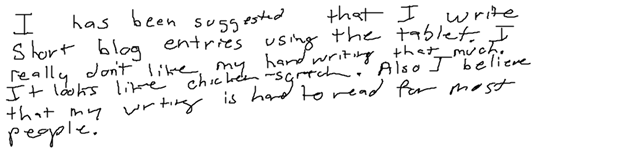
The ink thing didn’t go so smoothly at first. For some reason, I couldn’t get Windows Live Writer to write the correct path to the MovableType asset that it created. I had to login to the MT administration page for the first time in several days to correct the problem. I believe there was a configuration problem in WLW for the blog account itself, but I have fixed that problem now
 . I’m back to doing FTP upload for my images, since I prefer that method locally anyway. Its amazing the number of things WLW will do for me without me having to think about them. That whole image resizing thing is easier now that it will do it for me from files and then post the files to the correct folder on the server. Only thing I am not too happy about is the way it names stuff. The previous blog has a file called cb4a7aaeea24_1298C\Ink258377682672.png stored in it. Very obnoxious, but in most cases it gives me folder names that are manageable and make sense.
 Didn’t mean to tangent about the wonders of Windows Live Writer, back to Ink Blogging. I have no clue how I’m going to use it, but it now works correctly and I am a little excited about having it ready.

Anyone got any ideas on what I should do with this ability? How would you use an ink blog?