Category: C#

  • ExIf 35 – Re-evaluating an Abandoned Project

    I started the ExIf 35 project (http://exif35.pcfire.net) in 2010 when I returned to shooting film. Perhaps I’m metadata obsessed, or just crazy, but I decided I wanted good ExIf data on my scans of film photos. In the six years since I started the project I allowed myself to reach a point where I felt that ExIf 35 was “complete”, it did what it needed to do, usually pretty well. I made no major changes to the software since 2012 (see: http://exif35.pcfire.net/viewnotes.php) and I drifted somewhat away from film photography as a hobby and art again. This spring I purchased a Nikon F6 camera and dove right back in just as deep as I had been before with film photography – the only difference is that the F6 does a bit of its own metadata recording, which makes having a metadata/ExIf workflow even more important. Since the Nikon F6 was released in 2004 many of its accessories (MV-1) are no longer made and its intended software no longer functions in the modern era, so I had to seek out other alternatives and build new things into ExIf 35 to accommodate my needs.  When I speak of “my needs”, I refer of course to the fact that I record information beyond basic ExIf data. I like to record things like photographic filters in use and details about how the film was developed (see: http://exif35.pcfire.net/docs.php?doc=xmpSpec for a complete list of my special fields).

    Yesterday in a fit of boredom between semesters I began looking at some of my data in Exif as it was stored in Flickr. I realized that there was no degree symbol in my develop temperatures (20 C vs. 20° C), so I started tinkering with the data writing process, only to find out that putting that character in one location in the file (Exif:ImageDescription) caused Flickr to corrupt the field when it is displayed. In an effort to correct the problem I began looking at the field in other applications (ACDSee, PhotoMe, etc). I discovered two things 1) There is nothing wrong with the bloody thing and 2) There are a few new ExIf fields that I had not seen before. This led me to the ExIf documentation (http://www.cipa.jp/std/documents/e/DC-008-Translation-2016-E.pdf).

    Many of the fields that were added in 2012 to version 2.3 and in 2016 to version 2.31 are fields related to sensitivity speed and sensitivity type.   Most notably, ISO is no longer the only way to measure sensitivity. While I doubt I will use anything else, this represents a bit of an evolution in the way that metadata capture on imaging devices is represented. The addition of fields such as PhotographicSensitivity, RecommendedExposureIndex and a new ISOSpeed field expand options for the level of detail that is recorded for film sensitivity, although the creators of ExIf intended such fields for describing electronic sensors and their gain ranges – funny how those parallels between digital and film are maintained after all this time. When I first read about those fields my first thought was a very quirky film called Ilford Delta 3200. This film is marketed (recommended, even encouraged in DX) to be ISO 3200.  The actual film speed is ISO 1000. The film is regularly shot anywhere from ISO 800 to ISO 6400 (some claim it can push to 12,800). Once I figure out what each of these fields does in practice (through reading them in a variety of applications) and maybe through reading ISO specification 12232 I will be better prepared to use these fields to accomplish my goals. Some of the new fields relate to details of the camera and lens configuration used – these I am already implementing as they are clearly defined.

    I feel that I need to re-evaluate ExIf 35 because there are a lot of gaps in what it logs to files, what is collected from users and perhaps some difficulties with the way that it writes data in general. I have been away from the project for too long and have only added fields on occasion. The overall functionality of the application needs to be checked for compliance with modern standards as I implemented my ExIf writing in an experimental way, guessing at how things worked and then leaving things in place once they worked, which is perhaps not the best way to approach something as intricate as metadata. There are also fields that I have not tested in detail how they work, which may also introduce problems that cause some applications to not read the file accurately. The addition of new fields such as time zone offset present cases where the UI and the data storage (preferences and defaults) functions need to change to match the expectations of the standards. Adding the new ISO fields I mentioned before will require a change to the handling of recording ISO data, such as I will need new fields in the form to collect the data and will need to establish logic to ensure that all of the data is recorded accurately and consistently even with those fields are not filled out (very often I shoot and develop my standard film, HP5+, at its DX speed, so assuming the other values is fine).

    The project, and its documentation, are long overdue to be refreshed. There are many areas I have patched in new fields or extended functionality without reworking the workflow or the ExIf encoding process.

  • Making ExIf 35 Mobile

    The first application that I intend to write for Android will be a mobile version of my own ExIf 35 application. I have chosen to do this for several reasons. First, I need an application that has a clear purpose to write for my first application while I am learning. Second, at the current time the desktop version of the application relies on my use of a notes application for iOS or Android (carrying the device with me) or carrying a physical notepad and pen. This also requires me manually keeping track of a time stamp, which is in itself a waste of time.

    The first issue is fairly straight-forward. Its harder to write a good piece of software if you don’t know where its going, and you really can’t put a lot of effort into pre-designing the application because you don’t know exactly what the constructs of the development environment entail. Through using ExIf 35 as my base I know what its supposed to look like, what its supposed to do and I have a rough idea of how to get there, but the new environment still takes time to learn. Another advantage of using ExIf 35 is that the object classes are already written, so I don’t have to spend valuable time in the learning process trying to write a new object. My Exposure.cs and Roll.cs will be attached to the new application just as they are to the old one, and the cool thing is, if this works out, then I can keep them synced with each other and not have to ever unlink them (they are objects, thus not platform or environment dependent). While this means that I do still have to write and compile in C#, I am not bothered by this idea. Mono (open-source version of .NET) is a good and usually efficient set of libraries which should work well for what I am trying to accomplish.

    There have been complaints about  ExIf 35 not being mobile since the day I released it publically (literally, same day someone on Flickr demanded an iOS variant). I have to agree with these complaints, since I still have to use a notepad app on my phone or on my iPod to keep track of my exposures until I get back to my desktop to transfer them. This is a waste of time as it requires me entering the data twice. I considered writing a method that could use a standardize text file as input, but unfortunately humans aren’t very good at doing things in a standard way and we use so many personal conventions in recording things that it would require as much time to train a human to write the file as it would to write the application to do it automatically. The other issue is time-keeping. It is important for the purposes of ExIf  35 that times be kept fairly well and as such it is inefficient to have a human keep time, it just happens. I have also found that in using a notes application or a physical notepad I am less likely to enter the extended details of an image (filters used, whether it was close, macro or far, or any number of other settings) than if I were entering it in the desktop application immediately after shooting. While I do not anticipate having all of this information recorded from the start of the mobile app, it will be simple to use since the object class will be maintained.

    The hard part for me about writing the existing application over will be trying to remember how I did it. At present the application opens to the last file known, it knows to create a new file if there isn’t one and any number of other little goodies that I don’t even remember because it comes together so seamlessly. I don’t remember exactly what functions I wrote first before, and thus I will have to start from scratch at remembering how to do them again. A lot of code will be borrowed from ExIf 35, but transferring such a complex set of code over to the new application will result in a number of problems until I get  everything sorted out and linked with where it is supposed to go, so I won’t do very much of that until the basics are implemented.

    A final concern I have about writing the new application is its impact on its desktop predecessor. I will not immediately have the capability to sync data between ExIf 35 PC and the Android version, so I will mostly work on an active file and then transfer it back to the desktop at the same time as I take the roll out of the camera and only use the desktop version for making changes or for writing the data to the image files. This changes the primary role of the application and therefore I will have to re-evaluate the design of the desktop version. Its going to be an iterative process from borrowing the code through the impact on its predecessor.

  • ExIf Rotation Implemented

    image

    ExIf 35’s rotation functionality now completely works!

  • Adding Rotation to ExIf35

    image

    About 2 years ago when I thought I wanted to do film photography I started working on an application called ExIf35. The idea was to have the same level of data storage in JPEGs from a film scanner as those found in DSC (Digital Still Camera) image files. One of the biggest pains that I had was the confusing way in which ExIf rotation is handled. The old method required entering the rotation information when you first entered the data for the exposure. While entering aperture and shutter time is hard enough, the application expected the user to remember which way the camera was turned as well. This was of course a step up from the user needing to enter the actual ExIf integer for which way the frame was to rotate.

    Now I am working toward developing the form pictured above, it includes the same drag/drop or select tool that is used in the original ExIf writing process, except not requiring an output directory (because this form just saves to the data file, not the actual image file). Once all files are recorded the user can click on an image file to get a thumbnail image. Once I get the code written the blue and green buttons can be used to change the direction of the thumbnail and record the proper alignment for the ExIf notation. The data will then be saved to the ExIf35 exposure record in the roll file and the information can be written as normal.

  • Clipboard Image Save Application

    I was having trouble getting the Google Android SDK to save screenshots for me, leaving me with the only way to save them being to open MS Paint and go through the processes there to save them. Somehow, doing this only once was enough to make me want to write a better solution, so my less than half-hour solution to the problem was writing this basic application in C#. Its not complicated or particularly intelligent, but if you click in the gray box with an image on the clipboard it will paste it and save it.

    If anyone wants this overly simplified substitute pasting into Paint, you can grab it from http://users.pcfire.net/~curtis/software/ClipboardSaver.msi. It only works on Windows and will probably only install on a 64-bit Windows.

    image

    image

  • Personal Journaling

    I have many times in my past thought of starting a personal journal. I started at first a long time ago with a paper journal, and considered keeping a word processing document, but nothing ever seemed to work for me. In August 2004 with the opening of this blog I got a little closer to being able to do what I wanted to do, at least on the external perspective. I still do not have anything personal. I tried to do it in GITI for a personal way, but I just could never remember to write stuff and it just didn’t quite seem as together and coherent as I would like. I am now considering writing a software that will reside on a desktop computer, but will be able to write information somewhere that GITI can access it. The reason I feel I need to write my own software for this is that I want to keep more information in a journal than just a daily narrative and other plain text information. I want to be able to store sample photos from the day, and maybe a tracklog and other information that seems relevant to the events of the day. In some ways it would be nice to form my daily journal entries from a variety of little pieces of information and just have them grouped by the date. Those pieces include:

    • Text of day’s activities
    • Report of what is on the calendar
    • Collection of status posts and their timestamps
    • Photo(s) selected from the day, if available
    • Tracklog from the day, if available
    • Recipes for foods I create that day

    In some ways social media stuff handles a lot of this, except for the more private aspects, but I do not want something like a journal stuck in the cloud. I want control of the information and I do not want to be bound to some type of information system that can loose data, change control or in some other way be subverted by an outside force. This is probably crazy and excessive, but it will give me something to work on in my spare time.

  • New App: Match Maker Duplicate Finder

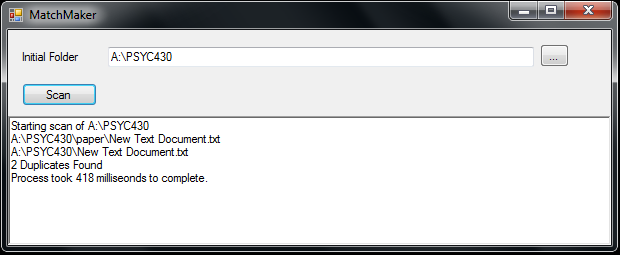
    At some point over the last few hours I threw together this application, its a minor app. I needed a way to identify potentially duplicate files in a certain folder on my network, and I really didn’t want to do it manually, so here is a quick little program to take care of that task in a rather dirty fashion. I use the program to identify potentially duplicate videos that have been stored in dated folders after being downloaded.

    The application is written in C# and requires .NET 3.5 to run (if you are on a modern Windows OS, you are ok). The program will take a folder you specify and treat it as the top of the tree, and from there recursively gather filenames. Once those names are gathered it compares all of the base file names as well as sizes. Not a fancy app, but thought it might be useful to someone.

    For Download: http://users.pcfire.net/~curtis/software/DuplicateFinder.exe  [14KB]

    image

  • Writing Destructive Code Is Fun

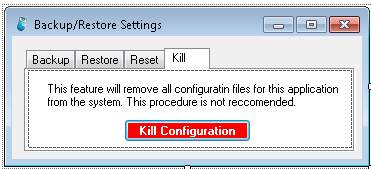
    I don’t know why, but writing code that is somewhat destructive is really fun. I was thinking earlier that there is no way in ExIf35 itself to fully remove the configuration file and remove personally-identifying information from the application. This seemed like it could be a bad things, so I set out to make a simple feature addition to ExIf35, a kill switch. It’s probably a little childish to make it this dramatic or to enjoy writing the code this much, but how often do you get to tell an application to go through and individually remove every file in a (system) folder? I didn’t do the really annoying application kill thing where there are 5 nested boxes asking variations of “Are you sure?”.

    image

    Red is always a fun color for a button, makes it look important and mysterious.

  • Cross Platform Compatibility Crushed

    I discovered last night that Mono does not contain certain parts required to make ExIf35 work on other platform, mainly, the basic parts of the Windows Presentation Foundation, which allow the metadata writing components that I use to function. At the moment I have no idea how I am going to proceed. It has crossed my mind to neuter out Form3 (the thing that writes exif to the files) and ship the application as is for other platforms, but that is somehow less than optimal. I have also considered doing everything normal, but then creating a special form3 that will write a .xmp sidecar file for each image, for later reintegration by another application. At the moment I am attempting to locate any way possible to write those values to the file that doesn’t use any part of WPF, so that there will be a chance that Mono can use it. My fear is that I will end up having to learn how to write directly to the image file in byte form to implement all of these fields. It would be neat to learn how to do that, but at the same time, quite a huge annoyance. So for now, sorry Mac users, it isn’t going to happen any time soon 🙁

  • Working Around a Flaw

    I have been fighting with a problem in code for several weeks now relating to the writing of a negative exposure bias value to exif information using the .NET framework’s metadata class. The class has a set of properties and a table of what is allowed to be written to each of those properties. Unfortunately for my project, there was an oversight in that system. A variety of properties, such as System.Photo.ExposureBiasNumerator, do not accept negative values, even though they are supposed to hold signed integers. This has caused me to need to cast an absolute value on all of my exposure bias values, making them all positive. I have attempted to inquire through the MSDN forums and other sources for a reason for this, waiting for someone to point out that I’m wrong, but so far, no one has, so I must assume that there is a flaw. All other values are easy enough to write correctly with no special cases.

    Tonight I have reinstated the ability to write negative values to exposure bias. Effective in ExIf 35 build 20100410 that functionality will be again functional.

    I knew that there had to be a way to make it work, since those values are present in other applications and applications using the .NET Framework can read those values. I pulled some images into my diagnostic form and began reading /app1/ifd/exif/{ushort=37380} (thats ExIf 0x9204) from each of them. I found that there was an 11 digit number recorded in the space for all of them, both with positive and negative values. This got me curious, since a 32 bit integer is only 10 digits. I double checked with Visual Studio and it turns out that my two signed integers were being stored as one giant unsigned 64 bit integer. I began by trying to determine what those numbers could represent, trying to find any and all relationships between those 64 bit integers and the 2 part signed shorts I was working with (relationship between 30064771068 and –2/3 for example). Finally I gave up and decided to read the bytes.  30064771068 is 251, 255, 255, 255,6,0,0,0. I know they are supposed to be 32 bit numbers, so that takes us to 251, 255, 255, 255 and 6,0,0,0. 251 –255 = –4, and 6 = 6, making a rational of –4/6, reducing to my expected –2/3. Now it all makes sense, but I ask myself, why must I generate a 64-bit integer manually to make this work when Microsoft has created perfectly understandable way to write this crap to a file. I guess sometimes being able to do things the old way has its benefits.

    So, now I present, my code:

    //Assume exp.ExposureBias is a string such as -2/3
    if (exp.ExposureBias.Contains("/")) //check for rational
    {
    double tmp = Convert.ToDouble(exp.ExposureBias.Split('/')[0]);
    tmp = tmp / Convert.ToDouble(exp.ExposureBias.Split('/')[1]);
    tmp = Math.Round(tmp, 1);
    exp.ExposureBias = tmp.ToString();
    }
    //convert to a valid integer value
    int exposureBias = Convert.ToInt16(Math.Floor(Convert.ToDouble(exp.ExposureBias) * 10));
    //create the array to hold the 64 bits
    Byte[] exposureBiasByte = new Byte[8];
    if (exposureBias < 0)
    {
    exposureBias = 256 + exposureBias;
    exposureBiasByte[1] = 255;
    exposureBiasByte[2] = 255;
    exposureBiasByte[3] = 255;
    }
    else
    {
    exposureBiasByte[1] = 0;
    exposureBiasByte[2] = 0;
    exposureBiasByte[3] = 0;
    }
    exposureBiasByte[0] = Convert.ToByte(exposureBias);
    exposureBiasByte[4] = 10;
    exposureBiasByte[5] = 0;
    exposureBiasByte[6] = 0;
    exposureBiasByte[7] = 0;
    Int64 exposureBiasLong = BitConverter.ToInt64(exposureBiasByte, 0);