One of the pre-requisites I have set for myself on getting a new laptop is that before I acquire the hardware I must first locate a suitable bag for the new device. This is turning out to be harder than picking the laptop itself, which after weeks of looking at technical information and seeking details about battery life, wasn’t a simple task.
First of all, I should mention my needs. I need something in the backpack class, but it must not be enormous. If it has room for an SLR with attached lens, then woohoo, but it isn’t required. The bag must cost less than the supplemental 12 cell battery for the laptop ($124), preferably a lot less. I would like the bag to be either yellow, graphite/charcoal, or black. I do not necessarily have to have a bag specifically designed for a laptop, as I intend to get the Toshiba recommended sleeve.
I am finding all of the bags I have seen recently are huge, ugly and designed for 17″ laptops. I am intending to purchase a laptop that is 13.3″, which is somewhat smaller than the 17″ size, so therefore, I need a bag that is smaller as well (not to mention not wanting to look like I am going on a hike any time I have the laptop with me).
Any ideas on good places to find the type of bag I am looking for? If anyone says “Endless”, I’m going to ban them from the blog.
Category: Technical
-
More Bothersome Bags
-
Virtual Kiln
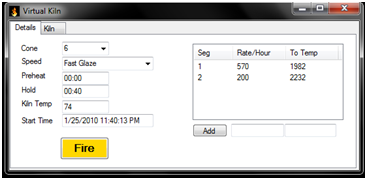
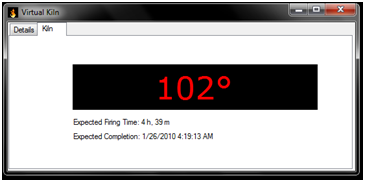
I have become bored and started playing with C# again. This time I designed a virtual kiln controller. It can calculate firing times based on a Bartlett controller’s prescribed programs, or it can accept a custom firing program. It is my eventual goal to have the software be able to estimate temperatures during firing as well as during cooling, but for the moment it only does the firing temperatures. Cooling is much harder because of all of the factors involved (including kiln fullness). The application tries to mimic the Bartlett V6-CF displays for the temperature and status display. It is a fairly simple application that I designed last week and over the weekend. It works for those of us who would like to know what temperature our kiln might be at, without spending $900 on K.I.S.S.
If you are interested, you can grab a copy of VirtualKiln from http://www.pcfire.net/VirtualKiln/
-
Looking for a Laptop
Over the past few days I have been conducting an increasingly less hypothetical search for a new laptop. My present system (CMK5-M) has served me well for almost 6 years and I feel that it may be time to consider a system that is more compatible with my present activities and that will serve my needs for another 5-6 years.
I have considered quite a few things including screen size, battery capacity, weight and whether the monitor is or isn’t touch sensitive. I began the search looking for tablet PCs, just because I think they are cool. I have found that there is a shrinking population of such devices. I also concluded that most of their displays are too small for what I’m looking for. I think touch is cool, but if I want a 12.1″ monitor, I’ll get another netbook.
I have been seeking performance in a new laptop, I have been using Visual Studio quite a bit lately and it would be nice to be able to not have to run a Remote Desktop connection to use it. Also, I’m looking for a system that I can call home, currently my data is scattered between two servers and I don’t really feel that any system I have presently is personal to me. In addition to performance, I need power. Some modern laptops feature battery lives less than 2 hours, to me that is unacceptable. The point of me having a laptop is to be able to take it places and use it away from the desk. I have run across some decent systems, but all of them have some fatal flaw. I saw a nice HP touch laptop, but the monitor was much too small, there are the Dell systems (Inspiron 15 primarily), but I wasn’t motivated by what I saw (aesthetically or in my geek hard-on). I was about to give up earlier when I decided to take a look at NewEgg for laptops. I ran across the most wonderful Toshiba, but unfortunately it lacks the battery power I really want (looking for above 4 hours, 8 is better), but then I ran across that laptop’s big brother. It was the same model, just different features (including a 64GB SSD and a 500GB SATA HDD), but noticed it had a battery with twice the capacity, so the geek hard-on is back, and I am giving heavy consideration to that Toshiba (A505-S6985), with an add-on 12 cell battery, which should make it a kick-ass system that will run for 6 hours or more without fail.
If a new system is selected, it will be designated CMK7-M, the mobile counterpart to my present desktop, CMK7.
-
XMTuner 0.3 Released
XMTuner 0.3 is now available for download.
http://xmtuner.pcfire.net/InstallXMTuner0-3.msi
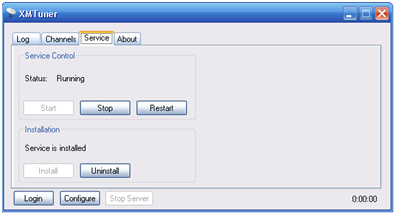
The new release features my Windows service and Chris’ channel cache feature as well as his meta data code which allows things like channel logos to be included in the What’s On page.
-
A Few Notes About Services
After developing a Windows Service in C# today I have a few comments on the topic.
- If you are using an app that needs a config file, to write logs, or otherwise interact with the disk, make sure the thing has been told a specific path or that you have its files in the place it expects them, not where you expect them (C:\Windows\System32 seems to be a popular place)
- In general, a service should never interact with the UI, if you try it and the service resists, take direction from the service and leave things as they are, adding UI, or developing a UI control for a service is a bitch, it isn’t worth it.
- Make sure you have functional console/command line code before you convert the thing to a service, it makes things easier to just click Play in Visual Studio instead of having to install/uninstall a service and start/stop/start a service in Windows when changes occur
- Services can make life easier if you are open to the idea that easier sometimes means more complexity.
- Services cannot speak for themselves like a UI or command line application can, remember to read that event log (and write to it occasionally from the app)
-
XMTuner 0.2 Released
Chris and I have just finished some major work on XMTuner (mostly Chris, I just smoothed some thing over). The new version has better support for Orb (which I still don’t understand), a system tray icon, and a really cool “What’s Playing” page. I don’t seem to have a lot to say about this release, except I still get very excited by new builds of things, no matter if it is something I am using or something I am writing.
General info is available at http://www.pcfire.net/XMTuner/
Download is at http://www.pcfire.net/XMTuner/InstallXMTuner0-2.msi

-
XMTuner 0.1 Released
http://www.pcfire.net/XMTuner/InstallXMTuner0-1.msi
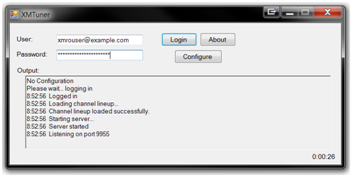
The project that Chris and I have been working on has gotten to a point where it is stable and usable. Nothing fancy here though, just a simple application. We have decided to call is XM Tuner (at least for now), and the first release version is 0.1. This is essentially an early alpha release, as we have plans for further development and some pretty cool features.
The application’s purpose as far as we are concerned is to replace an older app that is no longer developed, called uXM. The project was born out of necessity when the app we were using no longer was able to connect to the XM Radio Online system due to a change in behavior.
The application is designed to be used to connect to the XM RO system on one side, at which point it creates a feed that is usable by some UPnP media servers, such as TVersity. The UPnP media server can then in turn send the information along and help a wireless media player, Xbox or whatever connect to the XM RO stream. There isn’t a lot to say about it, because it is a simple application. Current the installed side is about 35KB, give or take 1K for the readme.txt file (which contains the information needed for using the thing).
The installer for the app is available for download from: http://www.pcfire.net/XMTuner/InstallXMTuner0-1.msi.
-
Real World C# Object Oriented Usage
I have never really had to work with Object Oriented programming for anything in the real world before. I have studied the theoretical implementations as well as done the course work required to make it happen, but this weekend I am getting my first taste of actually having to implement a solution (to an actual problem) using the C# language. Not to go into too many details, but there is a streaming media service that works on the concept of a web browser platform and then gives info off to a Windows Media plugin. Well, before a few days ago Chris and I were using another tool to read this info and let it pass through to TVersity so that we could listen to the stream without having to use a PC. A few days ago the media provider decided to change their URLs and as a result broke the previous tool. Unfortunately, we didn’t write the original tool, so there was no way to change the URL being used. In general, this sucks. We made an attempt at using C++ so that we could use some of the same libraries that the existing tool used, but unfortunately, after 45 minutes I couldn’t manage to get Visual C++ to take a string declaration (since C++ doesn’t take STRING as a primitive type). Once we threw C++ out the window and switched to C# everything came together and now the app is coming along nicely. I still have no clue if it will work, or if it will be able to be converted easily to a Windows service, but the whole damn thing is pretty fun to work on. I always stayed clear of object oriented projects, but this is coming out so clean as a result of using the objects. The only thing I am regretting is my lack of knowledge of how to extend/inherit classes in C#. I’m sure I could do it, but I probably wouldn’t like the difficulty in managing the resources implemented higher up in the chain. We have a pretty neat class that works on some of the HttpWebRequest/HttpWebResponse stuff in .NET, and it would be really cool to simply extend it with new methods than make everything have to call back to it. I might have to work toward that once this application actually works.
I can’t believe that I haven’t taken time to write anything except GITI in the past few years, even though I obviously have the proper training to do pretty much anything I want in C# or Java (probably C++ too, but just not Visual, MS seems to have corrupted the zen of C++). I haven’t felt particularly useful in technical tasks lately, as in most of them, Chris is more talented than I could ever hope to be, but in the area of C++/C# programming, I seem to be the only one who has gotten then hang of the languages, although Chris has been very useful in figuring out certain things of logic.
-
Back to Beta Testing
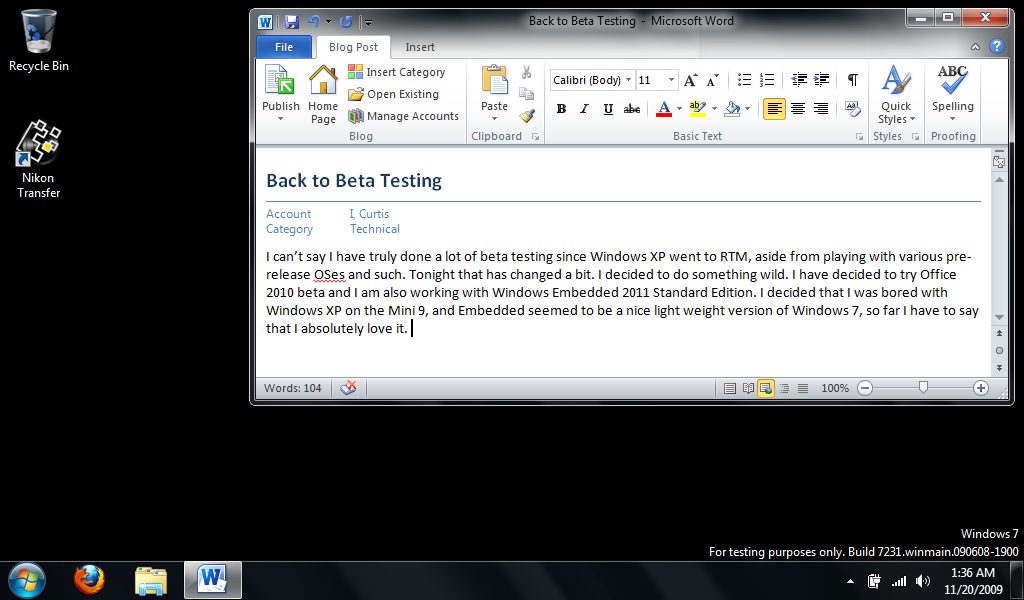
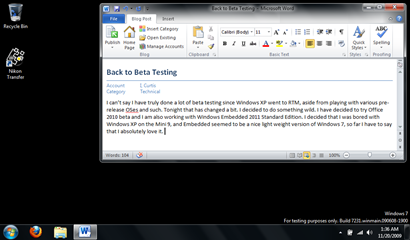
I can’t say I have truly done a lot of beta testing since Windows XP went to RTM, aside from playing with various pre-release OSes and such. Tonight that has changed a bit. I decided to do something wild. I have decided to try Office 2010 beta and I am also working with Windows Embedded 2011 Standard Edition. I decided that I was bored with Windows XP on the Mini 9, and Embedded seemed to be a nice light weight version of Windows 7, so far I have to say that I absolutely love it. It seems to be faster than XP on the Mini, and it definitely looks better on it.
-
Not Going to Take It Anymore
For a while now I have used Mozilla Thunderbird as my email client. I was happy with it, and then my friend urged me to try the betas of version 3, cause it was so much better. That may have been true for version 3, beta 3, but now I find myself hating beta 4. Apparently I have done something uber wrong with my configuration, because every five minutes I turn around and the damn thing is trying to index, or make my mail available offline. Those are not things that I want. I have turned the features off numerous times, but somehow they keep coming back, so thus the name of the post, I’m not going to take it anymore. I will probably end up regretting it, but I am switching to Microsoft Outlook 2007 for now. I say “for now” because I do not think it will be a long-term replacement. It’s sort of like when I was playing with Alpine/Pine, it was just to be different for a little while, so that I can actually appreciate the fact that there really are no good mail clients in the world and that I should just pick the one that annoys me the least, which is Thunderbird. It sucks and is slow, and tries to think too much, but at least it has a UI. That being said, I really much escape from Mozilla’s Thunderbird product before I begin waking up every morning and dreading the concept of checking mail because I hate my client. Worst part of it is, in my present situation, every time I have a problem with my client I get yelled at because it has to be something that I did wrong. There can’t possibly be anything wrong with a Mozilla product, not even in beta, so I must be the complete moron who has managed to break such a strong piece of software. I don’t take that shit for any product, no matter who writes it.