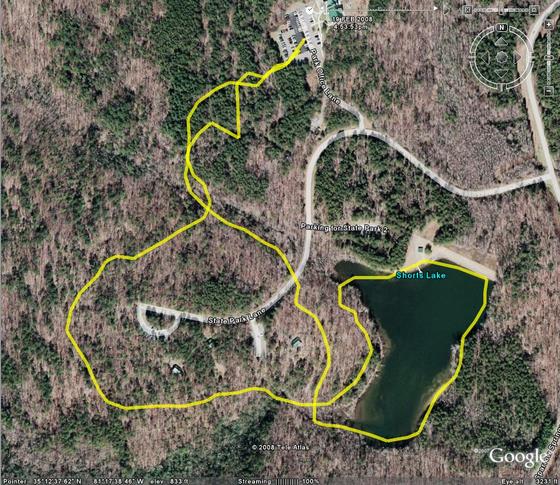
This is a sample of a tracklog being overlayed on a map, using Google Earth. This shows the best and worst of the GPS system. First of all, it provides a nice clear shape of where you travel. The trouble begins when the device records a bogus point in its log. When you see sporadic lines and lines that look like they should be the same, but aren’t, thats what has happened. In this map, the best example of this is at the top of the map where the device was on its return path to the park office parking lot. Those lines should overlap, or at least parallel, but on the reverse trip something went wrong, data bounced off of a cloud or some other interference “bounced” the signal, placing some of the trackpoints in locations where I didn’t travel.
Another GPS Use: GeoTagging
Another use for the GPS tracklock is geotagging. GeoTagging uses a digital or encoding film camera’s internal clock stamp on images in the EXIF data format and the tracklog from a GPS (automatically using known time information) to match points in the GPS to images. A lot of modern utilities, including Google’s Picasa (with Google Earth), can automatically associate the information in the log with the information the camera writes. The end result is an image that looks no different from before, but includes very detailed information in its attached EXIF data that will allow you to know exactly when and where a picture occurred. It may seem trivial to have that information in a picture, but when you think about it, photographs are very vague. A two dimensional rendering of a space doesn’t provide for many clues when it has been many years since a picture was taken. Every blade of grass looks like every other blade of grass, and environments change.
I have yet to take any pictures or store any tracklogs of any significance to try this yet, but I will attempt to do so as soon as the proper situation presents itself.
Upcoming Lunar Eclipse
There will be a full lunar eclipse for all parts of the world that experiences night at 0143 GMT (2043 EST and 1943 CST). It will occur Wednesday Evening/Thursday morning February 20/21, 2008. The full event lasts just over 3 hours, but we will experience totality for about 50 minutes. Totality will begin at 0300 GMT and 2200 EST. When entering the umbral shadow the moon will appear to be in retrograde of its cycle (it will be less full as the eclipse progresses) and then at totality we should see a bright red moon resembling an enlarged Mars (this is due to the refracting of light from the upper atmosphere, same phenomenon that causes red sunrises). During the late winter/early spring is the best time to see an eclipse, since the atmosphere tends to be clearer.
If this is the type of thing that interests you, I encourage you to try to enjoy it, as there will not be another total lunar eclipse until 2010.
For more information, see this Wiki article.
400
This entry is the 400th published entry in this blog. To celebrate this joyous, but not completely unexpected occasion, I have changed the theme of my blog. To complete this change it was required that the blog be completely rebuilt, some of the rebuild went well, other parts didn’t. Over the next few days I will clobber out the stuff that doesn’t and get it rebuilt AGAIN.
The new theme and templates will utilize some of the features that have been added to MovableType since I began using the old theme over 3 years ago. The most notable of which will be the use of “tags”.
It will take a bit of time for me to get used to this new theme, as well as the new templates, so there will likely be several more small modifications in the next few months.
Evaluating the Purpose
Having no other immediate plans for the evening I began work on LiveCurt.net immediately after my last blog post, but in doing so, I have stumbled on some problems. I have to question what my target audience for my website is. Is it for the 3 or 4 individuals who check in on me occasionally through the blog, or is it for a new target? I feel like I have so many skeletons in my closet that I openly reveal on my blog that maybe having my website’s purpose imitate it might not be a good then, but what if the problem is the opposite? Maybe I am too reserved on the blog and the new site should take on a life of its own that is more about who I really am and what I like.
I have gone over several concepts in my head and can’t seem to find one that truly fits into place. I thought about the original “SiteEngine Implementation Plan” for curtis.kularski.net, but that no longer seems right, that just seems annoying and cumbersome. Then another idea popped into my head, several sections utilizing different things to combine data. How unoriginal! I would like to syndicate my blog to the new site, thats a certainty, but I can’t grasp on to whether that should happen as a rolling list of titles, or if I should bring parts of recently blog entries to the page. Additionally, I have considered a news-based role for the main page, something where everything each new blog entry and other items are “announced”. One of the major things I have wanted to do with this is announce new shoes I add to my collection and things like my new tech toys. I want to also get back into writing technical articles like I used to do (killing curtis.pcfire.net will be a must, since its dead already). With this type of thing I run into a few boundaries that I must continue to operate with. My sneaker fetish is something I have gotten used to being pretty much common knowledge among people I interact with, but even though most people I know are very open minded, there is a TMI border I must uphold, after all, there are other sites I have constructed for that type of thing.
My primary goal with this project is to have a refresh of my personal web presence. The main problem is that for the last 3 years, this blog has been my web presence as I have let all of my other sites fall away during my time at university. The people I know now are not always the same people I knew three years ago, there have been some additions and quite a few subtractions. It would seem that my web presence currently is almost without purpose.
Current topics of interest for my new web presence: blog entries, news items, technical articles, creative writing, art, Doom (ZDaemon), garden info, my media library, fitness routines (public jock log), weekly summaries (end of week journal), a few of my favorite things.
This is what I know currently, I suppose now I should take it all and run with it and see where it gets me.
Question of the day:
What is the life expectancy of a blog?
Giving Life to LiveCurt.net
LiveCurt.net has been running for several months now, but I have done no development to it. I have considered numerous times copying my content from curtis.kularski.net to this domain, but I know what will happen if I do that. The copy would made and no further changes would occur. I am planning to play with a variety of designs sometime this month and get around to finally making the website come to life. Maybe I will try to do it in the next 15 days and have it ready for my 23rd birthday ;-).
Working with Tracklogs
The most useful feature of my new GPS unit is the ability to record and transfer tracklogs. Tracklogs are a GPS-friendly way of making a note of each piece of data they create when reading their latitude, longitude, altitude and time. There are several ways this information can be recorded. Magellan uses a standard non-friendly tracklog format. In this format a line of the track may look like this: “$PMGNTRK,3517.403,N,08115.616,W,00245,M,064603.68,A,,140208*6C”. Not many utilities outside of the Magellan platform will read/use this format. A more “universal” tracklog format is GPX, a format that uses XML to record the information. GPX is a native Garmin format. This format looks a bit like this:
<trkpt lat=”35.290050000″ lon=”-81.260266667″>
<ele>245.00</ele>
<time>2008-02-14T06:46:04Z</time>
</trkpt>
This format is very easy to read, but not many devices outside of a Garmin will use it by default. Now, once I get the information converted (currently performed by GeoVisu v.4) I can use the format in any number of applications. Most of the applications I have found DO NOT support using a background map, only a plotting of points… well… I have a TI-83Plus or a TI-89 Titanium that will do that… so we move on to the next step… see what Google can do for me. Google Earth is an application I have avoided for years, because I used to hate it. Google Earth now seems to be ok, so im currently using it to interpret my tracklogs (from GPX format). Another utility I have found that is somewhat useful is called TrailGauge. It uses US Geological Survey and TerraServer data to create a map of the points in the tracklog, but it is very slow and produces maps that aren’t very useful initially, also it is restricted to using about 30km of data at a time… which sucks for longer trips.
I am currently considering training GITI to perform the Magellan TrackLog to GPX Log conversion and perhaps keep a record of all of my tracklogs, but thats a feature for when I have a stronger understanding of the type of data I am working with. I will likely use Google Maps for now for my vehicular trips and TrailGauge for my hiking trips.
There are also some important questions I would love to have answers to:
1. What the hell is GeoCaching?
2. What do sane people do with tracklog data?
3. Are there any good maps availible of state parks that I can use?
My New GPS Unit
I have often been curious about GPS receivers, but could never justify one until recently. I found a good deal on this Magellan eXplorist 210 unit and I am planning to do a lot of hiking this year. I will be able to store all of my hiking trips in files and then use software utilities to create maps that I can post on this blog or just keep for personal reference of all of my hikes.
 |
 |
 |
 |
 |
 |
 |
 |
Random Thought: Changes
To make a change to your life, the first step is to decide to change.
Hold It

Isn’t it nice when instructors are responsible?