Staring At Nothing

I have been “working” on my personal portal for weeks now. Mostly that “work” has been staring at it and wondering what it is supposed to be. I have made no progress building the thing from scratch, just seems to be too abstract to tackle that way. The technical aspects of everything I want to do are well understood, but the design aspects are lacking, and in my world, design comes before code. The exception to that would be my status page, which is technically the project that comes before the portal. For the status page, it is not meant to be pretty, just simple, and straight forward.

Things that come from GITI I am comfortable displaying, because I know how they should be displayed, and I have a general feeling of what I want it to be. Also helps that I wrote (most of) what comes from GITI, so I know what to expect for output. OK, so maybe I do have a few technical issues to work out with the personal portal before I can fully write it. The technical aspects are not what block me from making actual code though, it is the aesthetic confusion. Artistically, my code makes no sense.

Happy Valentine’s Day

How many years have I written this post?

Anyway, Happy St. Valentine’s Day to the special boy in my life 🙂

And to the rest of, may you find true love on this very commercial of holidays.

Uses of a Spreadsheet

untitled

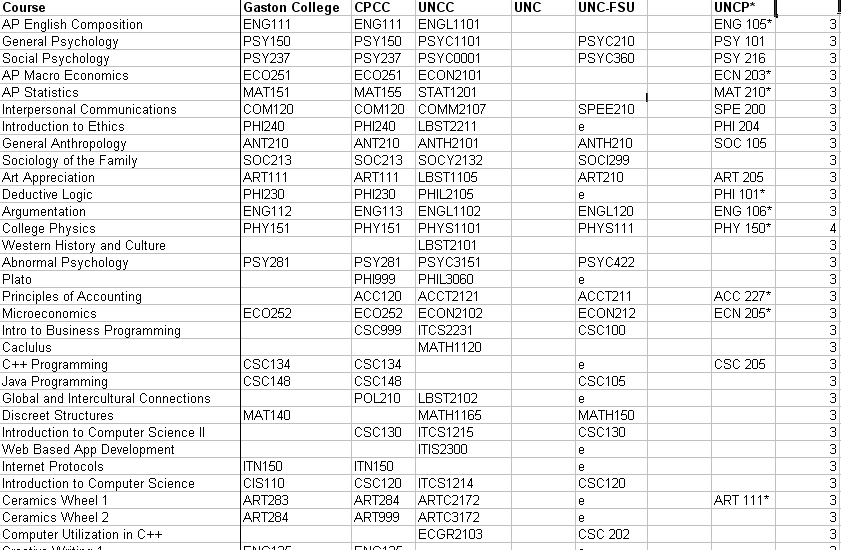
I don’t have a lot of use for spreadsheets anymore. Most things I do I keep in a MySQL database and have accessible from GITI or some other insane little utility, but for some reason I am maintaining my transfer equivalency matrix in a standard Excel spreadsheet (where maintaining is updating when I remember). So many things are inefficient about this thing, including, having no reference for what the origin institution is… but then again, that’s the beauty of this form,  they are just courses, with no institutional dependency, just what they are acknowledged as at each school. Perhaps it is time to move this into GITI.

Key: e = Elective granted; * = projection (no credit yet awarded); [blank] =  confirmed non-transferability


Geez! I must be bored, I never used to blog stupid shit like this.

Degree Audit (Associates)

If I were to complete my deck of Associate degrees with the full assortment I would have to meet the following requirements:

Associate of Fine Arts in Visual Art

  • 2D Design (ART 121)
  • 3D Design (ART 122)
  • Three studios from Photo 1 (261), Computer Art 1 (171), Painting (240), Jewelry (247), Print Making (231) or Sculpture (281)
  • Total of 15 SCH remaining

Associate of Sciences

  • College Physics II (PHY-152)
  • Calculus II (MAT-175) and Calculus III (MAT-271)
  • College Transfer Success (ACA-122) WTF? I’m articulated bitch! 
  • Total of 13 SCH remaining

 Associate of Applied Sciences in Computer Programming

  • Introduction to Programming and Logic (CIS-115)
  • System Analysis and Design (CTS-285)
  • Computer Programming Capstone (CSC-289)
  • Database Concepts (DBA-110) ugh! can I substitute?
  • Operating System Concepts (NOS-110) see above
  • Security Concepts (SEC-110) ok, I assign root/admin too much
  • Network Concepts (NET-110) or Network Basics (NET-125) didn’t I do this in Network Engineering?
  • Information Systems Business Concepts (CTS-115)
  • Linux (NOS-120) or Windows (NOS-130) pretty sure I could exam out of it
  • Advanced C++ Programming (CSC-234) if my prayers are answered
  • Total of 30 SCH

While the AFA and AAS in CP are equally useful, I am more likely to complete the AFA because there are too many redundant requirements in the Computer Programming Degree. If I completed the AS it would be after everything else was done and just for the fun of fucking with people.

Helping a Caveman Find His Way

Just when I thought my father  could not find any more ways to annoy me with technology questions, here comes the newest inquiry, regarding a GPS. Apparently my mother has to go to Charleston, SC for 3 days to work next week and her boss is willing to pay for the Saturday as well, so both parents are going. My father approached me to inquire if I have a Mer Girlin (Magellan) device. After about 4 attempts of him repeating it and him angrily declaring “you know, punch in the address and it tells you where you are”, I was able to translate from his native cave-man to English (or is it Portuguese?) to determine that he was asking about a Magellan GPS device. I showed him my device, and he was not impressed (well duh! Mine doesn’t talk and is for getting my ass out of the woods, not for road trips).

Now through some weird deduction of his logic he has gotten “Yes I will help you pick one” out of “I might go with you to pick one”, so I guess I am going to go help my father find a suitable GPS device to blow $300 on to help him navigate a 3 hour trip to South Carolina (although, if Gilligan got lost in a storm, my father might get lost on a slightly windy day).

At the present time the  going recommendation is a Garmin nüvi 205W Navigator.

To My Friends

To be my friend apparently requires a very specialized set of skills and abilities, so much so that only three people in my life fall in to the category of “friend”. Chris, Oscar, Matt; the three of you have consistently shown patience to my moods and have always returned when I have tried to run you off. For this I am very thankful. My self-isolating tendencies make having many friends nearly impossible. I am very happy that the three of you have stayed with me for as long as you have.

Reinstall is a Lot of Work

  • Windows XP SP3 Base Install
    • Install forgotten network card driver
    • Join domain
    • Install Dell QuickSet
    • Install FireFox
      • Del.icio.us Plugin
      • Download Helper
      • Flash
    • Install Thunderbird
      • Accounts (about 7 of them)
    • Install Office 2003 (not using 2007 on laptop yet)
      • Install Office Service Pack 3
      • Install Office 2007 converter pack
    • Install Winamp
    • Install Windows themes
    • Install Adobe Acrobat Reader
    • Install Pidgin
      • Configure GTalk
      • Configure AIM
      • Configure Yahoo
    • Install ACDSee
    • Install PuTTY
    • Install Programmer’s Notepad
    • Install Windows Live Writer
    • Configure Application Defaults


The slipstream saved me from installing the service pack, which probably cut about an hour off of the install time, and also, most of my drivers were already installed and ready to go. Biggest pain is the settings for the individual apps (Pidgin, WLW primarily). Otherwise, everything was smooth, but a reinstall is still an absolute bitch and not something I want to do on a regular basis.

I’m sure I’m still forgetting something, but I will take care of that later.

Slipstream Windows XP Installation

I just finished creating a slipstream (with unattend) Windows XP with SP3 CD. If it works it will be pretty cool. Ubuntu was slowly driving me bonkers and I sort of missed Windows XP, but knew my XP install on the other partition was aging quite a bit, and I really did not want to do a “fresh and clean” install of either Windows XP SP0 or of one of the patched versions. I have like 14 keys for Windows XP, about 7 of which are for SP0, so I decided to take one of the old ISO images and turn it into an SP3 CD, using one of the keys for SP0.

At the moment I am at one of the blue and white install pages, waiting for Windows to format my drive to take the new OS. I have moved all of my old data from my local documents and settings folder for myself, so hopefully I got everything I will need from the system. Since I know the chances of getting back into Ubuntu after this are quite low, I went ahead and backed up everything I cared about from my previous installation (primarily my Alpine data and FSTAB). When backing up my Alpine data it occurred to me that it is one of the few applications I can not run on Windows that I will likely go looking for at some point, but with that, I could always PuTTY into the Suse [virtual] machine on the network and run it from there.

If everything works as it is supposed to, once the drive is formatted, Windows will install itself (fully integrated SP3), join the domain (by itself) and then wait for me to log in. All of my drivers (I hope) are already on the CD, so all Windows has to do is map them to hardware and include them in its database. If everything works, then once I get into Windows, the system should map drive S: to my server and launch the installs for Firefox, Thunderbird and Windows Live (for Windows Live Writer).

If all goes well tonight and I get XP back running, then I will get Ubuntu reinstalled either later tonight or in the morning. I had some thermal issues with my laptop last time I installed Ubuntu, and it also installed larger than I would have liked, so I am likely to try to customize it a little more, since I now know most of what I am looking at.

On to the Unattend!

Noise: A New Feature for VoIP

VoIP used to boast its clarity and noise-free signals. Now, there is a new feature for some VoIP systems (such as Microsoft Response Point) to promote, Comfort Noise. I found this particular quirk when looking at some D-Link VoIP network products and noticed it was listed as a feature. At some point when cell phone reception is nearly perfect, will we begin to see Sprint offer “Comfort Drops” on their network, so that the user does not loose touch with reality?
I am not sure how I feel about this. I like the clarity and noise-free environment of my TW digital telephone service, why would I want to add noise to it?
http://en.wikipedia.org/wiki/Comfort_noise