I have been reading the book I obtained yesterday, “Total Body Plan”. I have picked up a strong quote that I am going to stick with for the duration of my personal “body plan”… “abs are made in the kitchen”.
The quote is good and helps a lot, but I have one major obstacle, the resources of my kitchen suck. I don’t have a clue how to prepare a meal that avoids heavy carbohydrates and encourages the consumption of protein.
I guess over the next few weeks I will learn how to make things work for me, and with the help of friends and professional resources I will learn everything I need to know for having a healthy lifestyle.
Category: Hobbies
-
“Abs are made in the kitchen”
-
Starting the plan
With my birthday approaching quickly (tomorrow) I was eager to get my plans made and my workouts started yesterday. I was planning a nice brisk hike to inaugurate a time of physical fitness and overall health, but I got to Crowders Mountain and there was no where where to park, which meant the trails would be crowded. Then on top of that I hadn’t planned even physical activity to get me through the week. All of the books I have are for more specific training once I get started, they don’t give any clues to how to build a workout routine, or how to eat properly while following a workout routine. I stopped in at the bookstore, and picked up another book for my collection. I picked up Men’s Fitness Total Body Plan (978-1-57243-971-9). This book is supposed be a good plan for beginning this type of life. I guess that is why this one contains the word “Plan” in the title. I have the “Hard Body Plan”, but that is for a little later in this process I believe.
I started this morning with one very productive activity. I hung my new pullup bar that I bought yesterday. I have already found that I suck at doing pullups, but I think it may be because of lack of technique and fear of the bar that I installed falling off the wall while i’m in mid-workout. -
First Attempt at Rocktop Trail
Yesterday (February 29, 2008), I attempted a new trail, Rocktop. It is a 1.5 mile strenuous trail that is mostly upward with many hazards associated with mountain climbing. The trail is quite nice. On Pinnacle you can only see the mountain ahead of you and the trees that you have already passed, but on Rocktop you get many opportunities for some very nice views as you ascend the mountain. At about the middle of the trail you can see the radio and other communication towers that are located at the peak. That is where the hike ended for me. I have for a long time had a fear of heights. This fear occurs only when I can see the ground below me through a straight line descending down, such as while hiking up a trail without many curves (Rocktop). While I turned back this time, next time I intend to take the trail all the way to the top.
And now for some GPS data….

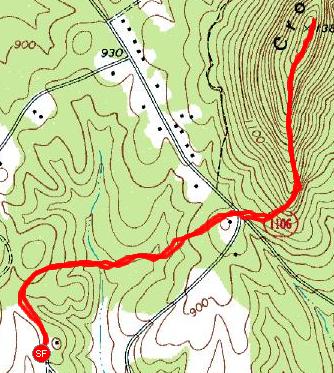
The overall trail. The trail to the west of the road is the first half of Crowders trail. Once crossing the road there is an option, continue on Crowders (a less rocky, but more winding trail to no where… ) or go to the right and head up Rocktop. On this map, everything highlighted to the east of the road is Rocktop.

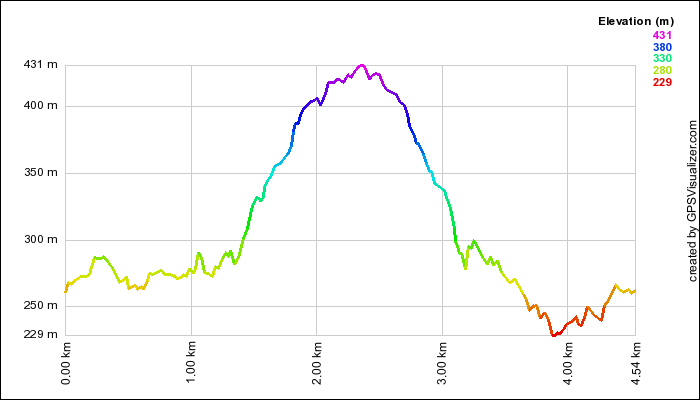
This is an elevation profile like the one in my previous post. It shows with its curve and with color, the level of height

Here is a new way to look at it, it is overlayed on the same map as the usual Google Earth maps. The altitude is shown in varying colors, indicated by the key on the side.

This is a speed profile that shows how fast (or slow) I was going during the hike. Obviously, as the hills become more steep, I became more sluggish. There are also a few points during which I stopped to take a break.
If you are interested in all of the details of the hike, they are located at http://www.livecurt.net/gps/20080229.html. -
Elevation Profile of Hike
Now that I have had a little more time to play with the data obtained during my hike on Monday, I have found a few tools that will allow me to show interesting things from the tracklogs. One of my favorite things so far is the elevation profile, which shows the change in elevation during the hike. This isn’t likely to be something that I generate for every tracklog, since most of them are either flat and boring, or they are on such a tiny scale that every mild incline looks like a mountain (they look like an EKG, which doesn’t show a balanced or sensible geographic profile). The thumbnail of my first elevation profile is below. As always on my blog, click the image to see it big.

-
A Hike To The Top
King’s Pinnacle

I am a bit fatigued at the moment (woke at around 3am and then went for a hike), so I am just going to let the GPS explain everything: [click me] -
Desire for Self Improvement
I have been sitting beside my bookshelf for the past hour while working on various things online, primarily taking care of some course related stuff. The bookshelf sits in this room, usually undisturbed unless I’m pulling something specific from it, usually for research or adding something to it, usually some book I will get to reading eventually.
Directly to my left is the reference section (I own about 3 fiction books, total), which contains numerous books on personal health and fitness. These are books I have been collecting until I can have a plan of attack which includes them and I think I am approaching that point. I don’t work out well because I don’t have a plan, I become bored because all of the exercises that don’t require special equipment are all the same. I am going to change that. First, I think it is time to build a pull-up bar unit outside and it is also a good time to get back into either walking or jogging EVERY night. I have become too stationary again, like so many times before. I work very well when I have a plan and a schedule, so thats what I am going to do. I am going to set goals for myself, based on the United States Marine Corps basic fitness requirements. My longterm goal will be to obtain the highest score possible on these measurable tests. For the short term I intend to use the tests as a guide for where I need to be as far as fitness. Once I have gotten into motion towards the long term goal, I will also add in some other goals, such as working towards my ideal body look. My Polish genetics will be hard to adapt for in this plan, but I am going to do my best. I am fairly short, but almost maximum height for a Pole, so the only thing I can do is work on areas such as my obliques to get my width under control, which shouldn’t be a problem. I can deal with the broad shoulders and wide hip bones as long as my obliques give me some definition.
My guides for this goal will be:
-USMC Guide Book of Essential Subjects (0-967-51236-0)
-Anybody’s Guide to Total Fitness (0-7872-9878-1)
-Men’s Health Hard Body Plan (1-57954-229-8)
-Men’s Health Book of Muscle (1-57954-769-9)
-Complete Book of Abs, The (0-375-75143-2)
-USMC Workout (1-57826-158-9 (maybe, if I get up the balls to do it)
and for balance I will seek guidance from:
-The Perfectible Body: The Western Ideal of Male Physical Development (0-8264-0787-0)
I will spend some time this week preparing for this and then I will begin execution of it no later than next Monday. -
Sample Tracklog Map Overlay
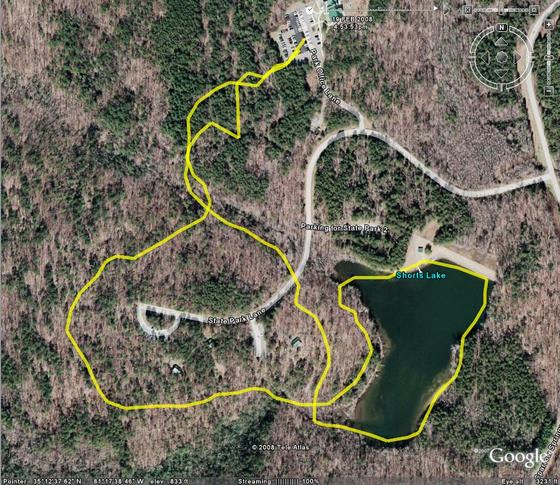
This is a sample of a tracklog being overlayed on a map, using Google Earth. This shows the best and worst of the GPS system. First of all, it provides a nice clear shape of where you travel. The trouble begins when the device records a bogus point in its log. When you see sporadic lines and lines that look like they should be the same, but aren’t, thats what has happened. In this map, the best example of this is at the top of the map where the device was on its return path to the park office parking lot. Those lines should overlap, or at least parallel, but on the reverse trip something went wrong, data bounced off of a cloud or some other interference “bounced” the signal, placing some of the trackpoints in locations where I didn’t travel. -
Another GPS Use: GeoTagging
Another use for the GPS tracklock is geotagging. GeoTagging uses a digital or encoding film camera’s internal clock stamp on images in the EXIF data format and the tracklog from a GPS (automatically using known time information) to match points in the GPS to images. A lot of modern utilities, including Google’s Picasa (with Google Earth), can automatically associate the information in the log with the information the camera writes. The end result is an image that looks no different from before, but includes very detailed information in its attached EXIF data that will allow you to know exactly when and where a picture occurred. It may seem trivial to have that information in a picture, but when you think about it, photographs are very vague. A two dimensional rendering of a space doesn’t provide for many clues when it has been many years since a picture was taken. Every blade of grass looks like every other blade of grass, and environments change.
I have yet to take any pictures or store any tracklogs of any significance to try this yet, but I will attempt to do so as soon as the proper situation presents itself. -
Working with Tracklogs
The most useful feature of my new GPS unit is the ability to record and transfer tracklogs. Tracklogs are a GPS-friendly way of making a note of each piece of data they create when reading their latitude, longitude, altitude and time. There are several ways this information can be recorded. Magellan uses a standard non-friendly tracklog format. In this format a line of the track may look like this: “$PMGNTRK,3517.403,N,08115.616,W,00245,M,064603.68,A,,140208*6C”. Not many utilities outside of the Magellan platform will read/use this format. A more “universal” tracklog format is GPX, a format that uses XML to record the information. GPX is a native Garmin format. This format looks a bit like this:
<trkpt lat=”35.290050000″ lon=”-81.260266667″>
<ele>245.00</ele>
<time>2008-02-14T06:46:04Z</time>
</trkpt>
This format is very easy to read, but not many devices outside of a Garmin will use it by default. Now, once I get the information converted (currently performed by GeoVisu v.4) I can use the format in any number of applications. Most of the applications I have found DO NOT support using a background map, only a plotting of points… well… I have a TI-83Plus or a TI-89 Titanium that will do that… so we move on to the next step… see what Google can do for me. Google Earth is an application I have avoided for years, because I used to hate it. Google Earth now seems to be ok, so im currently using it to interpret my tracklogs (from GPX format). Another utility I have found that is somewhat useful is called TrailGauge. It uses US Geological Survey and TerraServer data to create a map of the points in the tracklog, but it is very slow and produces maps that aren’t very useful initially, also it is restricted to using about 30km of data at a time… which sucks for longer trips.
I am currently considering training GITI to perform the Magellan TrackLog to GPX Log conversion and perhaps keep a record of all of my tracklogs, but thats a feature for when I have a stronger understanding of the type of data I am working with. I will likely use Google Maps for now for my vehicular trips and TrailGauge for my hiking trips.
There are also some important questions I would love to have answers to:
1. What the hell is GeoCaching?
2. What do sane people do with tracklog data?
3. Are there any good maps availible of state parks that I can use?