Category: Getting It Together Interface

  • The Modules

    Module Status Description
    Address Book Stable Converted from its independent state, Address Book is fully functional with no presently pending issues or incomplete features. The module is however, due for an overhaul to bring it into the GITI space more completed as well as to refine its mission.
    Bookmarks Dead Module was started a few times in different ways. Module was never completed and is not currently in the list of modules to be created.
    Collection* Stable Feature complete module for managing footwear, wear logs and various other attributes. This is Chris’s module to maintain. I am just a happy user.
    Cookbook Theoretical This module is in the planning phase, but should become a fully functional module for managing recipes.
    Documents Minimal This module is very much functional, but in a minimal state. None of the planned advanced features exist. The module is a very basic document editor for creating fairly plain documents, such as MLA style research papers.
    Education Incomplete Education is almost complete, but not quite. There are still many outstanding features as well as some bugs that need to be resolved. The module is quite usable and can easily manage classes for many semesters, including course planning for future semesters.
    E-mail Dead Simple send-only email tool, recorded sent mail to the database. Utility is no longer functional and has been removed from GITI.
    Health Variable Health is listed in GITI as a module, but it really is not yet, it is an “umbrella”, it contains other modules (or parts of modules). Health contains the very simple, but yet functional masturbation logger, an almost non-existent Nutrition module that does basic meal tracking including calories, fat, protein and carbohydrates. There is also a nice module created by Chris that can track workouts and progress towards fitness goals.
    Inventory* Planning Inventory does not really exist. It is prototyped based on Library. Its eventual goal will be to track a bit of everything. The original data that was given to it was a glaze list, which has since become inconsistent. Eventually it should be able to track any physical assets, including things that need to be reordered, or just general stuff that is around that might need to be recorded.
    Journal Stable Journal is a bit of a shell module as itself, but it is much more robust as ItemJournal, its inter-modular counterpart which utilizes a lot of the same code. Over time I have lost the need for Journal personally because I tend to blog whatever is going on, especially now that I have a private blog as well. ItemJournal is more useful for associating information with objects in other modules.
    KeyChain Minimal Minimalistic utility for storing software keys. It works, that’s about it. 
    Library Stable It puts books in, it checks books out. Nothing more complicated than that. It is a nice, clean module.
    Notepad Stable Its a hierarchical notepad system, supporting multiple “pads” and “pages”. Another one of the “clean” modules
    Schedule Unknown Schedule, the module that gave GITI its internal name, is in a somewhat variable stage at the moment. Its between being sort of working and being ready to be overhauled. The module works ok. It schedules things, including stuff other modules need to add to the schedule, but some of the stuff, like invitations and a working calendar are not yet implemented.
    Status Complete There is not much to it. Its hooked up to a web interface. It manages a status put into it. Doesn’t even require its own page, plugs right into the summary system.
    Summary* Complete This module takes “summary” information from other modules. This can be anything from contacts with birthdays occurring soon, to assignments coming up soon in Education. It is quite useful, but of course, like anything that is truly working in GITI, I didn’t write it. This is considered part of GITI’s core code.
    ToDo Deprecated This version of ToDo has a lot in common with its GITI v1 predecessor, including about 90% of its code. It works, but not very well. I haven’t used in in a long time because it just doesn’t fit in with the rest of GITI v2. This version was actually reverted to the original code after a close call with being rebuilt from the Notepad module. Seemed like a good idea at the time, but after the fact, it wasn’t pretty.
    ToDoList Minimal This is a new approach to To Do. It does not look or feel anything like the other attempts at ToDo. So far, it is only a simple list, as featured in a previous blog entry. It will be finished with more detailed management soon, but for now, it stands as it is, quite usable.
    Weather* Complete Uses weather channel weather information. Not much to it on the user end, but a pretty nice module. Thanks for yet another module Chris.

    * Not my module

    I now understand why I have had to rework the menus lately, more modules than there is space, plus there has to be space for the independent constructs.
  • GITI Cookbook

    We’ve all seen a cookbook and there are tons of web-based as well as desktop applications for cookbooks as well. So why would I want to write my own for GITI? First of all, because its GITI, it is MY Personal Information Manager. Second, I like things a little more  custom to the application of things than some of the other apps are. I do not need shopping lists and things generated (at this point anyway, and if I do later, that will probably be coordinated with the Inventory module). The third reason is because there is a lot of integration I can see for this. From just being able to store and retrieve single recipes to being able to assign “tags” to recipes to make them part of a master meal plan, it can all be used across multiple modules. Finally, if I write the code, then I know how the data is assembled and I can more quickly build web apps that use the information or even write an app in C# that can use the information.

    The major origin of this entire project is my recent growing collection of recipes I am keeping in a 3-ring binder. Most are from Cooks.com or other similar sources, but some are recipes that I have written. I do not like having my recipes stored in physical form, it limits my access to them as well as makes it more difficult to get another copy if I get something on the physical pages. I will probably still keep my physical copies in a notebook, since I tend to be a little messy when cooking (especially baking).


    The planned functions for GITI Cookbook are:

    • Recipe Storage
    • Search by name
    • Search by ingredient (perhaps even multiple)
    • Servings adjustment for recipe output
    • Nutrition export directly to GITI Health
    • Date/Event Tagging
    • Image of food (when available) via GITI Assets
    • Notes about the recipes (alternate ingredients, etc)
  • Little More Attention to ‘Quick Key’

    One of GITI’s least developed features is called “Quick Key”. Basically, it is a shortcut system for GITI. Type your command in the box (a “key” command, not the fully GITI path) and it takes you where you want to go. Unfortunately, they are very simple, and most rely on module functionality to make them work. The biggest drawback to something like this is that it is not possible to type “add assignment” and have GITI pick up the meaning on that. The most advanced that gets is being able to call a specific assignment by number “assignment 1143” returns the details page for Assignment #1143. The way that works is that GITI only recognizes one word in the string for the key, so if there is more than one, it breaks it up and passes the other part as a parameter to the module.  This eliminates any possibility for “natural language” keys, which sucks. Most keys do not even accept parameters, so that further limits flexibility.

    Add, Find and View are some of the functions I would like to add as universals, but I have not quite gotten to writing the core level code that would allow GITI to have its own internal keys that are not module dependant. To do this will also likely require me teaching GITI a list of mappings for each of the special “natural language” commands (ie. “Add Recipe” calls Cookbook’s Add function). Find should be especially interesting, since at this point no modules, except Address Book and Library even support the ability to search for anything. The weirdest possibility for “find” would be writing a universal search tool that would look through specified fields on each module’s entities. I would worry about the database load of such a functionality though. I am not sure how “natural language” typing the phrase “find contact Kularski” actually is.

    All of this stuff comes up now because of the creation of a new empty module called “Cookbook”. The module at the moment has no code, only its GITI constructs and things that will expedite my ability to write the module. It is a fairly simple module on the surface, its ingredient lists, directions and cooking times. No big deal at all there. I will likely get into more elaborate concepts such as categories and ingredient searches, but so far, I am just planning to create the data constructs for them and put not much effort into writing those components,focusing on the “important” stuff, like recipe insertion and retrieval. The mere conceptualization of the module causes these other needs to arise in Quick Key because it is a module that can require things to be accessed in a short amount of time, perhaps being pecked out on a keyboard using the end of a wooden spoon.

    Quick Key could be a very useful functionality if I spent more time with it and perhaps made it more obvious in the user interface (beyond a small textbox).

    Quick Commands
    Key Title Address
    about  About GITI    root.giti.home.about
    assignment  View Assignment    root.giti.education.view
    calendar  Calendar    root.giti.schedule.calendar
    checkers  Checkers    root.giti.home.games.checkers
    class  Class Overview    root.giti.education.classes.view
    classes  Class Details    root.giti.education.classes
    cook  Recipe Search    root.giti.cookbook.search
    cookbook  Cookbook    root.giti.cookbook
    courseplan  Planned Courses    root.giti.education.classes.planned
    doc  List Documents    root.giti.doc.list
    education  Education Home root.giti.education
    food  Add Meal Record    root.giti.health.nutrition.new
    frog  Frogger    root.giti.home.games.frogger
    hangman  Hangman    root.giti.home.games.hangman
    help  List Quick Commands    root.giti.home.quick.list
    home  Home    root.giti.home
    homework  View Current    root.giti.education.list
    keychain  KeyChain    root.giti.keychain
    mario  Mario    root.giti.home.games.mario
    pacman  Pacman    root.giti.home.games.pacman
    people  Find Person Record root.giti.addressbook.quickfind
    quick  Quick    root.giti.home.quick
    schedule3  Schedule3    root.giti.schedule3
    schools  Manage Institutions    root.giti.education.manageinst
    sneaks  Sneaker Collection    root.giti.collection
    tetris  Tetris    root.giti.home.games.tetris
    time  Time    root.giti.home.time
    wank  Add Masturbation Note    root.giti.health.sex
    weather  Weather    root.giti.weather

    exhibit 1: Quick Key command list

  • GITI’s Hidden Talents

    GITI comes across as a very timid web app. It doesn’t even attempt to be Web 2.0 at all, aside from a little CSS, but things are not as simple as they appear on the surface. There are many functions and tools hidden in GITI that have hardly ever made it to a menu. I don’t know why I have allowed things to get like they are, but there is NOT a good menu system for GITI at this point. For something with Interface in its name, it is lacking in end-user friendly components, such as menus that clearly outline the functions that are available.

    Last fall, Chris became a student and at the same time became a GITI user for more than tracking what sneakers he wore when (a module he wrote). At the time the class tracking functionality was somewhat limited, most things had to still be managed manually, except for class closing (which is easier to do one class at a time as they close when you are bored at the end of a semester… when do you think the function was written anyway?). I added more features to make things easier,  including a class planning and registration process, but  that functionality was not apparent and the entire process was a little obtuse. Functions designed to make batch management simpler ended up being easier to do manually, one course at a time. Seems a little counter-productive. The truth is, aside from the new welcome page for the Education module (which almost screams “MAIN MENU”), nothing else even gives a hint to the new functionality. Part of GITI’s charm is supposed to be an integrated menu system that is universal across the system which will allow “one click” navigation (in v1 it was like 3, but still, no new page to load to get to your function). Getting from place to place should not require loading a separate page, and certainly should not require actually entering the module to get access to its internal side bar menu, that makes the modules too independent and less part of a cohesive system.

    Another thing that has come to my attention is that GITI is no longer modular. If you pull out certain modules, other modules stop working. They are more like organizational units of functional code. Education now has a dependency in Address Book, Address Book has a dependency on the Asset manager functionality, nothing is separate anymore. The lack of separation makes GITI more usable in my opinion, but it also makes it less versatile. There is no common API yet, just a bunch of code held together by a string (literally, a string variable, called cmd).

    So much stuff is hidden because it isn’t in a menu and isn’t in a user friendly location. There are functions in GITI that even I forgot were there.

  • Instructors Are Annoying

    ok, the title sounds bad, but it really is not about my instructors, its about my instructor objects. Today I have been working on moving some things around and creating a bond between the AddressBook and Education modules. I want my instructors (present and future) to be registered with the AddressBook so that I can store a lot more information about them. The problem with this comes from the process for associating an instructor to a class and the handling of old instructors.

    The main issues are:

    • Allowing user to enter information, but avoiding duplication of instructors
    • Keeping Class.Instructor and the Instructor object consistent
    • Promote data insertion at various points in the process without overwhelming user
    • Keeping my sanity while tracking all possible permutations of data manipulation

    I have a majority of my code written, but there is still a lot of things I need to consider to prevent data contamination.

  • GITI: Dependant Assignments?

    It has just occurred to me that something about the way I handle assignments in GITI is a little off. While the concepts for the assignments are the same as are used in regular classes or even online classes, they do not always truely reflect the work flow and other features of the student’s side of an assignment.
    An example of this can be seen in the paper I am presently preparing for. I have a certain part of that assignment due on the 8th (although, I have GITI making it due tomorrow to give myself time). The assignment is to prepare an APA style title page, abstract and reference page for the paper. That is all that is due tomorrow. The problem I see is that that stuff is shoved into Assignment # 1342, even though it is technically for the completion of Assignment # 1348 (due March 24th). There is no mechanism for moving the completed stuff (the “Docs”) to the other assignment and no way to incorporate notes or anything else I add to assignment 1342 into the final paper assignment (#1348). Last semester I had a similar problem, in American History there were 3 “research projects” that led up to one final research paper. There more than here, there were useful things that I could have used in the final assignment.
    This analysis brings me to two new types of assignments that I would like to add to GITI. One is “dependant” assignments that can recieve information from other assignments (maybe using GITI’s Link functionality). The other is “marker” assignments, these assignments exist to receive grades, but do not necessarily need to appear on the schedule. The “markers” are due to a discussion board assignment in one of my courses (Art History) that will almost certainly always be done at the same time as my quizes, and therefore, are redundant to appear on the schedule proper.
    Another potential change is the addition of a control on the GITI Home (Summary v2) display for assignments, which would prevent the display of any assignment whos “Date Assigned” date had not passed, giving the user the ability to actually use the field for something useful, such as entering that date to be the date an assignment will be active. In online coruses this could be quiz activation dates or any variety of things like that. The idea being to bring more relevant assignments to the front and supressing assignments that can not be dealt with yet. This function may also at some point come with the ability to “surpress” an assignment, such as a test or quiz that is to be taken in person that has already been prepared for, even though it has not been finished.

  • The Suckage That Is ‘Doc’

    GITI has many nice features, including its ability to track file names for assignments and in general be responsible for holding information about the majority of my academic work, but there are some areas where functions that are not directly part of the Education module, but that it relies on, have failed to be developed as well as the Education module components itself. Today the external dependancy that I am pissed at is the GITI ‘Doc’ module. ‘Doc’ is a simple module, always has been, with its primary functionality to be allowing the writing of lengthy documents within GITI itself. I was attempting to work on a research paper for Cognitive Psychology and found that I could not easily do a page break without having to add a new document to the assignment for each page. This is somewhat less than ideal. I also found that there is no concept of spacing for things like vertical centering because it is not something easily done in HTML (except with tables, which I suppose might be my best bet here?). I do love Doc, but sometimes its simplicity becomes a hinderance to my work flow, since I sometime have to find creative ways to do what I want to do in it. That being said… Doc is a lot less annoying that Microsoft Word for a lot of tasks. Word has this thing about pagniation that no matter what setting you put the thing on, it still recognizes that it is on a page and hints at this (if even only by little dashes across the document). GITI Doc has more of a flow and I can type most of my formatting without fighting with Word’s complicated controls for that type of thing. I don’t have to loose flow and use the mouse to do things like bold my text, or apply an underline, I just type <strong> and <u&gt where I want it to be :-).
    I need to spend some time working on things that are not part of Education, I might one day leave the world of academics and have a need for some components of GITI for other things.

  • New GITI To Do Module

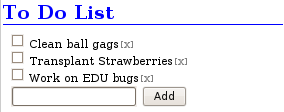
    I feel like I have rewritten the ToDo module so many times, but it probably has only been two of three rewrites. None of my rewrites have been anything useful, or anything I have even really looked at after it was written. There was even one revision that once completely finished, I rolled back to the original version of ToDo. Now I think I have something that might work well. I have moved away from my traditional GITI item manager style of writing a module and moved to a somewhat smaller implementation. The module’s current entire UI is displayed below. All there is to it is a list, each item with a checkbox, a method for deleting unwanted items and a way to add new entries. As with any GITI module, this is not as far as it is planned to go. This is just its primarily implemention, on the GITI summary (home) page. Additional functionality will be added to allow items to have a deadline, as well as add a verbose description.

  • Complicated Functionality for GITI

    Most things I do in GITI are not that difficult to code, actually, everything I do is very simple code. There is nothing object oriented or even anything more complex than a few simple arrays, it keeps GITI sane to work on to not write it differently (and I’m not sure to what extent PHP would be flexible to other constructs), but there are areas of complication in GITI.
    Usually these complications are in the form of logical process or user interface considerations. Last night I did something I have considered doing for a long time, I copied all of the instructors and their email addresses from the class items to the address book system to prepare for a more efficient way to store more information about instructors, including their pictures, office hours, office location, etc. My problem comes in the form of how I want to handle the way GITI thinks about this storage of information. For some unknown reason I wrote some really complicated code last night to break apart instructor names from the single-field format to work in Address Book’s more complicated multiple field format for a person’s name. The code is pretty reliable, have a look at http://users.pcfire.net/~curtis/class_INSTRUCTOR.php.
    Now the issue that I have to deal with, which apparently does not involve that code at all, is when, and how to put the instructor in the address book. GITI now supports a multiple step academic procedure going though: planning, registration, semester activation and semester closing/grading. This process means that I have multiple locations where I could make this insertion, but I have to pick the right one. The largest problem I am facing is that users are not required to go through the process, they can do their course statuses manually still, insert a class, and then change its status as needed. For the process, I have thought about putting instructor information in the address book during semester activation, , but I am almost afraid that would be too invasive of that part of the process and perhaps even an unfriendly burden on the user when given the option to do that for all instructors at the same time. During the registration process might be a little more ideal, as it is more of a calm setting, usually involving a lot of waiting after registration itself; but there I run into the issue of instructors changing between registration and course activation. The third possibility I have considered is adding a new step to the process, this process would be a per-course process to be handled after semester activation, something I have temporarily called the “Syllabus” step. This step would give the user the chance to update course descriptions, add special notes about the instructor’s policies, as well as add grading information to GITI. Optionally, I can also let the user finish the process off by adding a bulk insertion of assignments at the end. For users who would change their course information manually, I can check against the database manually at the time course info is edited and let it catch things and process them as needed, since I may end up doing the same thing with edit anyway (as a simpler way to change instructor info than visiting the address book management tools).
    The education module is at this point very robust and every decision I make about the way things function will impact its future development. It is now possible to streamline the entire process of documenting academic information in GITI. We are so far beyond adding individual courses and then adding assignments to them (or better yet, adding assignments and associating them with an array of courses stored in a file on disk somewhere).
    Once I get over this decision hurdle and then put all of my functionality in a logical order with itself I will spend a good amount of time with Visio or another tool and rebuild the native GITI menus for the module, as well as its own internal index and the “Edu Bar” on the side of all module pages. There is a lot of stuff burried in the module that it is not revealing in a useful way.

  • GITI Status: January 3, 2009

    Getting It Together Interface… I never get tired of typing it out like that. In the past two days I have been working on GITI, primarily in the education module. I have made almost no progress towards the mobile version, but at the same time, there is no immediate need for it.
    At this time, I am grasping a very strange notion that has just occured to me… the Education module is essentially finished. All of the functions I had hoped to include in it are in place and everything works now. There are a few buggies to tweak here and there, but nothing major, no huge goals to accomplish, everything is in. Last time I felt like this, I threw out a few sample interfaces for GITI v2… I don’t see v3 coming out of this or anything, but I do need to spend some time assessing GITI’s other functions that do not rely on me having an academic career to keep attention to, although, that isn’t likely to be an issue (more on that later). The most neglected things on my roster right now are things derived from the Notes system in GITI. This includes KeyChain (software license key manager), Item Journal (personal and per-item journaling), To Do (to do list, needs a good whacking) and Doc (think like Word, except allows HTML formatting and no damn paper-clip). KeyChain does what it needs to do, but nothing else. It won’t even edit keys once they are added. Item Journal is nearly non-existent in its stand-alone form. It needs work in that form, as well as in Blog Integration. To Do, is it version 3 or 4 now? To Do is a lost cause in all of its present states. It doesn’t do anything unique from Schedule (which has been delegated to another developer at this time). I have some ideas, but they will require a lot of baking before they become a good GITI module. Doc is a healthy component. It has its standalone functions, as well as its integrated functionality. All of it works, sometime really well, but I think I need to document it a little more before I can let it be truly “complete”. It relies on the user having the ability to read and write in HTML, something which works great for me, but might be a little excessive for some people.
    In general, GITI is healthy and functioning well. Even with one module complete, there are still plenty more that call to me (especially Health and Fitness for some reason).